WoowBot drives WooCommerce checkouts by turning customer questions into buying-intent signals, product recommendations, qualified leads, real-time objection handling, and follow-up opportunities. WoowBot connects Conversational Forms, Live Chat, and WooCommerce Retargeting so WooCommerce stores can use conversation data to move more shoppers from product discovery to checkout.
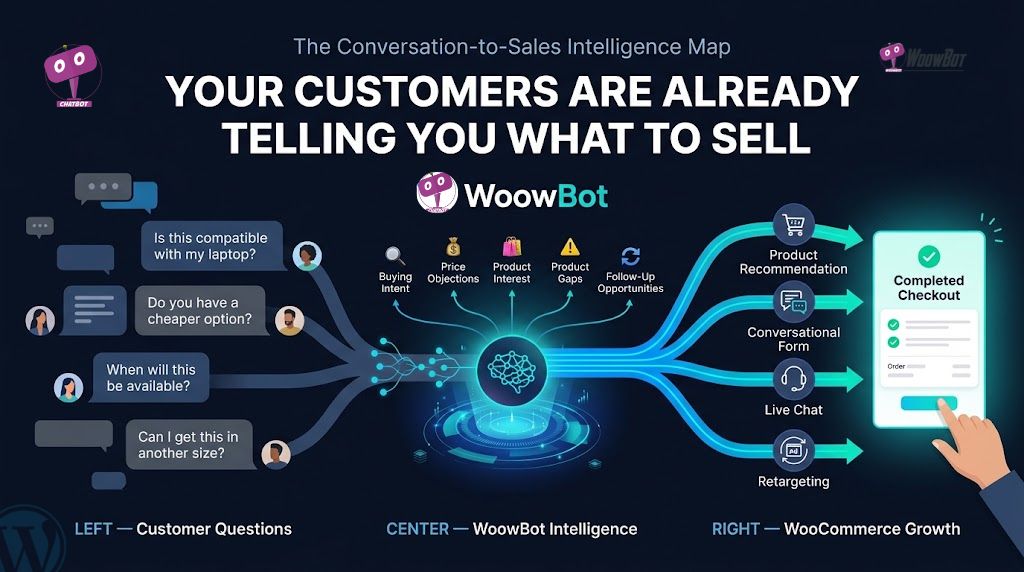
Why Are You Guessing What Customers Want When WoowBot Already Has the Answers?
Most WooCommerce stores already collect valuable customer research.
The problem is that customer research often lives inside scattered chat messages, abandoned forms, product questions, compatibility requests, price objections, and support conversations.
WoowBot can turn those conversations into structured commercial signals. WoowBot can identify what customers want, what prevents customers from buying, what products customers compare, and what information customers need before checkout.
A customer asking, “Do you have a cheaper version?” is not just asking a support question.
A customer asking, “Will this work with my device?” is not just requesting technical information.
A customer asking, “Can I get five units?” is revealing potential purchase quantity.
WoowBot can treat those questions as buying-intent data.
That changes the role of a WooCommerce chatbot from a basic FAQ widget into a conversational sales and customer-research layer.
Why Does Customer Chat Data Matter More Than Guesswork?
WoowBot customer conversations reveal actual customer intent instead of hypothetical customer intent.
Analytics can tell WooCommerce store owners that a visitor viewed a product for 90 seconds. WoowBot conversations can reveal that the visitor stayed because the visitor could not determine whether the product was compatible with existing equipment.
WoowBot can expose the reason behind the behavior.
Consider a WooCommerce store receiving 20,000 monthly visitors.
Suppose 1.5% of visitors purchase:
20,000 × 1.5% = 300 orders
If WoowBot-assisted product discovery, objection handling, and follow-up increase the effective conversion rate to 1.8%:
20,000 × 1.8% = 360 orders
The difference is:
60 additional orders per month.
If the average order value is $75:
60 × $75 = $4,500 additional monthly revenue.
That is an illustrative model, not a guaranteed WoowBot result. The important point is that WoowBot gives WooCommerce stores multiple measurable conversion events instead of forcing every visitor into the same generic checkout path.
What Exactly Can WoowBot Learn From Customer Questions?
WoowBot can turn repeated customer questions into actionable WooCommerce insights.
| Customer question | WoowBot signal | Possible WooCommerce action |
| “Is there a cheaper option?” | Price sensitivity | Create a lower-priced offer |
| “Does this work with X?” | Compatibility concern | Add compatibility information |
| “Do you have another size?” | Product variation demand | Review inventory |
| “Can I buy 10?” | High purchase quantity | Create bulk pricing |
| “When will this be available?” | Product demand | Review stock planning |
| “Which product is better?” | Comparison intent | Improve comparison content |
| “Do you ship to my country?” | Delivery concern | Improve shipping information |
| “Can I return this?” | Purchase-risk objection | Clarify return policy |
WoowBot makes each conversation potentially useful for product pages, FAQs, sales processes, inventory decisions, and retargeting campaigns.
How Can WoowBot Conversational Forms Capture Buying Intent Before Checkout?
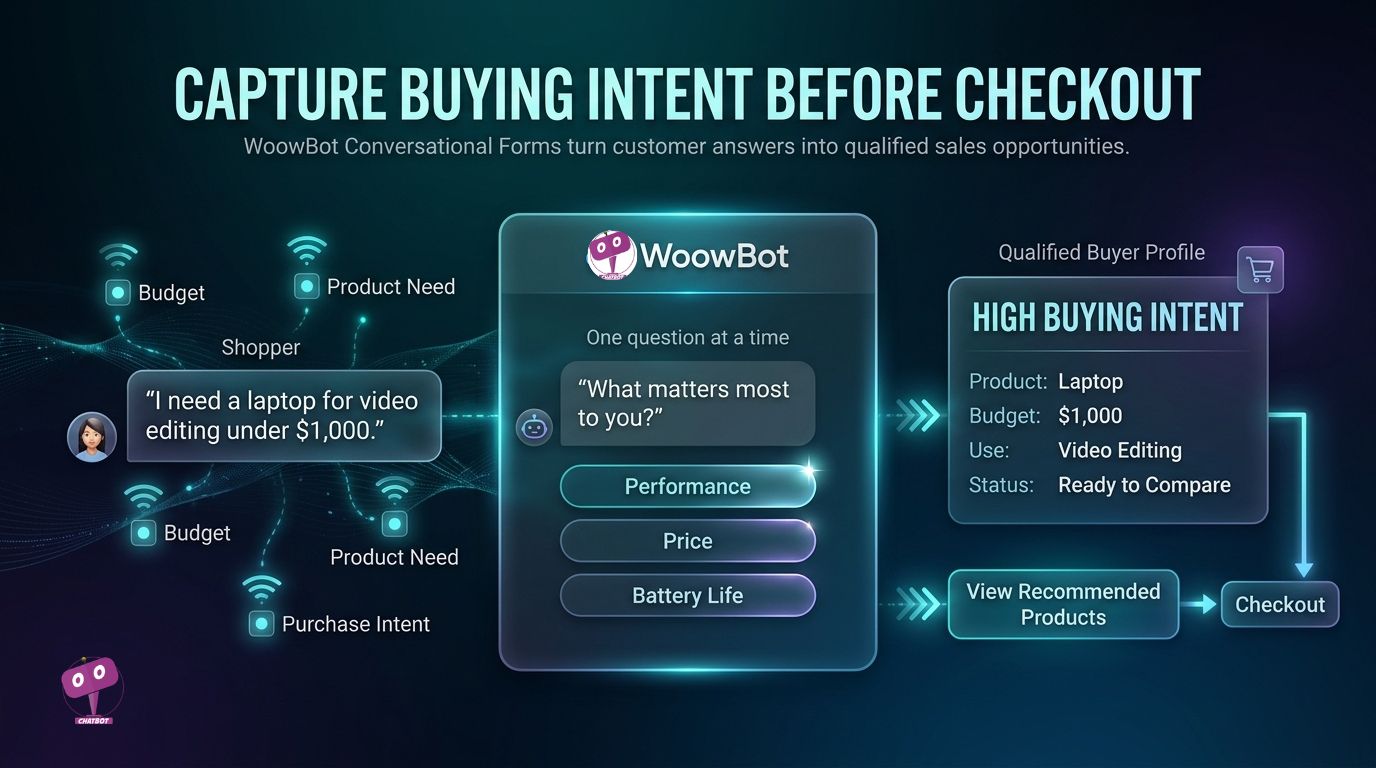
Traditional forms often ask customers to complete a wall of fields before customers have explained what they actually need.
WoowBot Conversational Forms can replace that static experience with a progressive conversation.
WoowBot Conversational Forms support conditional conversations, conditional fields, variables, lead capture, database storage, email delivery, and webhook integrations.
Instead of showing:
Name
Email
Phone
Company
Product
Budget
Message
WoowBot can guide the visitor through a sequence that reflects the visitor’s answers.
For example:
WoowBot: What are you looking for?
Customer: Office chairs.
WoowBot: How many chairs do you need?
Customer: 20.
WoowBot: Do you have a target budget per chair?
Customer: Around $150.
WoowBot: Would you like help finding suitable options?
That conversation contains far more commercial information than a generic “Contact Us” submission.
Why Does WoowBot Ask One Question Instead of Ten Fields?
WoowBot can ask about the product category first.
WoowBot can ask about budget after identifying the product category.
WoowBot can ask about quantity when quantity affects the recommendation.
WoowBot can request contact information after the customer has already received useful assistance.
That sequence matters because WoowBot can make each question contextually relevant.
How Can WoowBot Turn Form Answers Into Qualified Leads?
A WooCommerce store could capture:
- WoowBot product category: Gaming laptop
- WoowBot budget: $800–$1,000
- WoowBot quantity: 1
- WoowBot requirement: Two-monitor support
- WoowBot buying timeframe: This week
- WoowBot email: Customer-provided email
- WoowBot phone: Customer-provided phone
That lead is dramatically more useful than:
“Please contact me.”
WoowBot can use structured conversational information for sales follow-up, recommendations, segmentation, and external automation.
Can WoowBot Send Conversational Form Data Outside WordPress?
WoowBot can send individual conversational-form submissions to configured webhook URLs. WoowBot also supports webhook configurations for broader conversational-form and email-subscription workflows.
That architecture allows WoowBot data to move toward external systems such as CRM, marketing automation, analytics, or custom applications.
A practical flow can look like:
WoowBot → Conversational Form → Webhook → CRM → Sales Team
WoowBot therefore does not have to leave valuable buying information trapped inside a chat interface.
Why Can WoowBot Live Chat Recover Sales That Product Pages Miss?
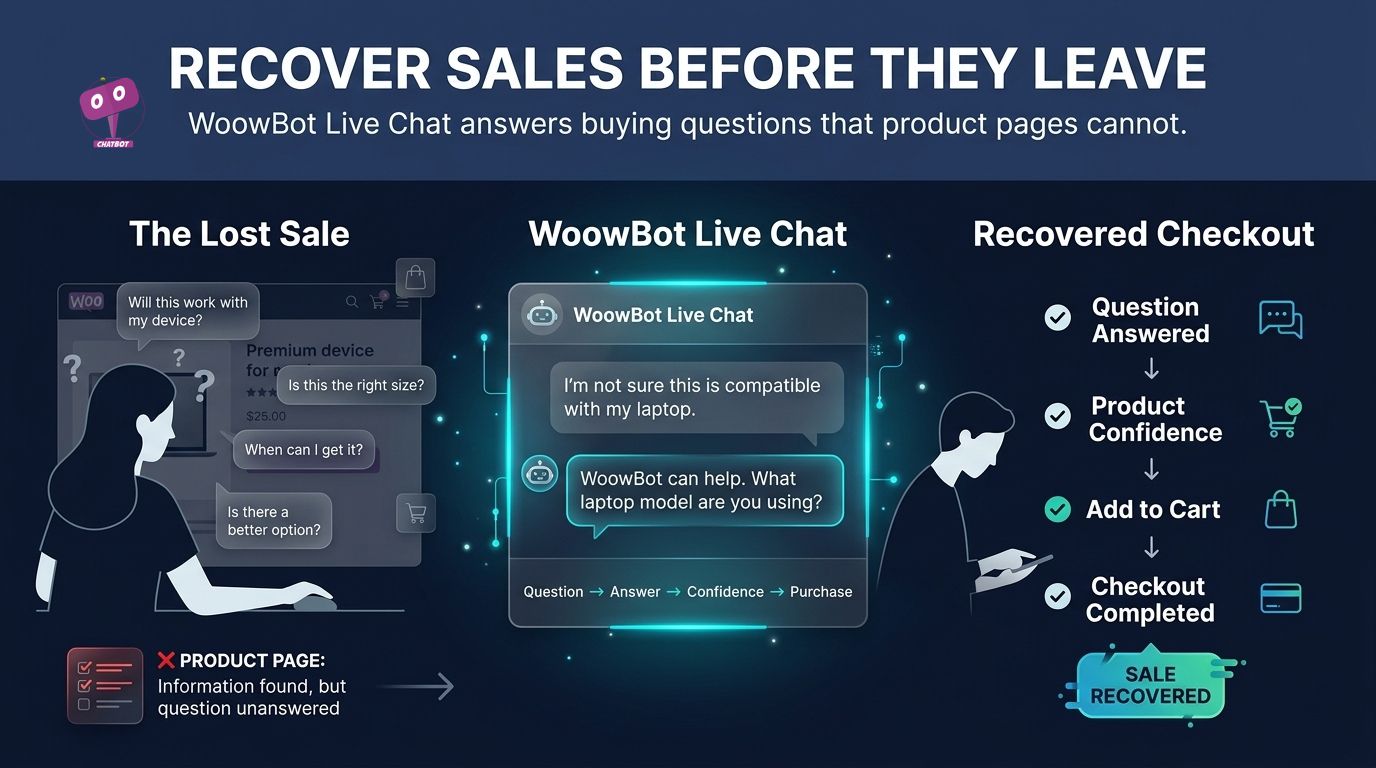
A product page can explain specifications.
A product page cannot always understand the exact question a shopper has at the exact moment the shopper hesitates.
WoowBot Live Chat gives shoppers a conversational route through uncertainty.
A shopper might understand 95% of a product page and still refuse to purchase because of one unanswered question.
WoowBot Live Chat can address questions involving compatibility, specifications, availability, shipping, returns, product differences, and purchase requirements.
What Happens When WoowBot Meets a High-Intent Shopper?
A typical WoowBot journey can look like:
- WoowBot identifies product interest.
- WoowBot answers product questions.
- WoowBot helps compare relevant options.
- WoowBot identifies objections.
- WoowBot offers Live Chat when human assistance matters.
- WoowBot guides the customer toward checkout.
- WoowBot captures useful information for follow-up.
WoowBot therefore connects discovery, evaluation, assistance, and conversion instead of treating every stage as a separate marketing system.
Why Is WoowBot Live Chat More Valuable During Product Comparison?
Consider three questions:
- WoowBot: “Which laptop should I buy?”
- WoowBot: “Is Model A better than Model B?”
- WoowBot: “Will Model A support my existing monitor?”
The third question contains a specific purchase objection.
WoowBot can use the conversation to identify the missing information and direct the customer toward a more appropriate product or support path.
How Can WoowBot Turn Repeated Live Chat Questions Into Better Content?
If 50 customers ask about compatibility during one month, the product page probably needs better compatibility information.
If 35 customers ask about shipping before checkout, the shipping information may be too difficult to find.
If 25 customers ask whether a cheaper alternative exists, the store may need better product comparison content.
WoowBot can therefore turn Live Chat into a continuous content-research system.
Why Does WoowBot Retargeting Matter When Customers Already Showed Buying Intent?
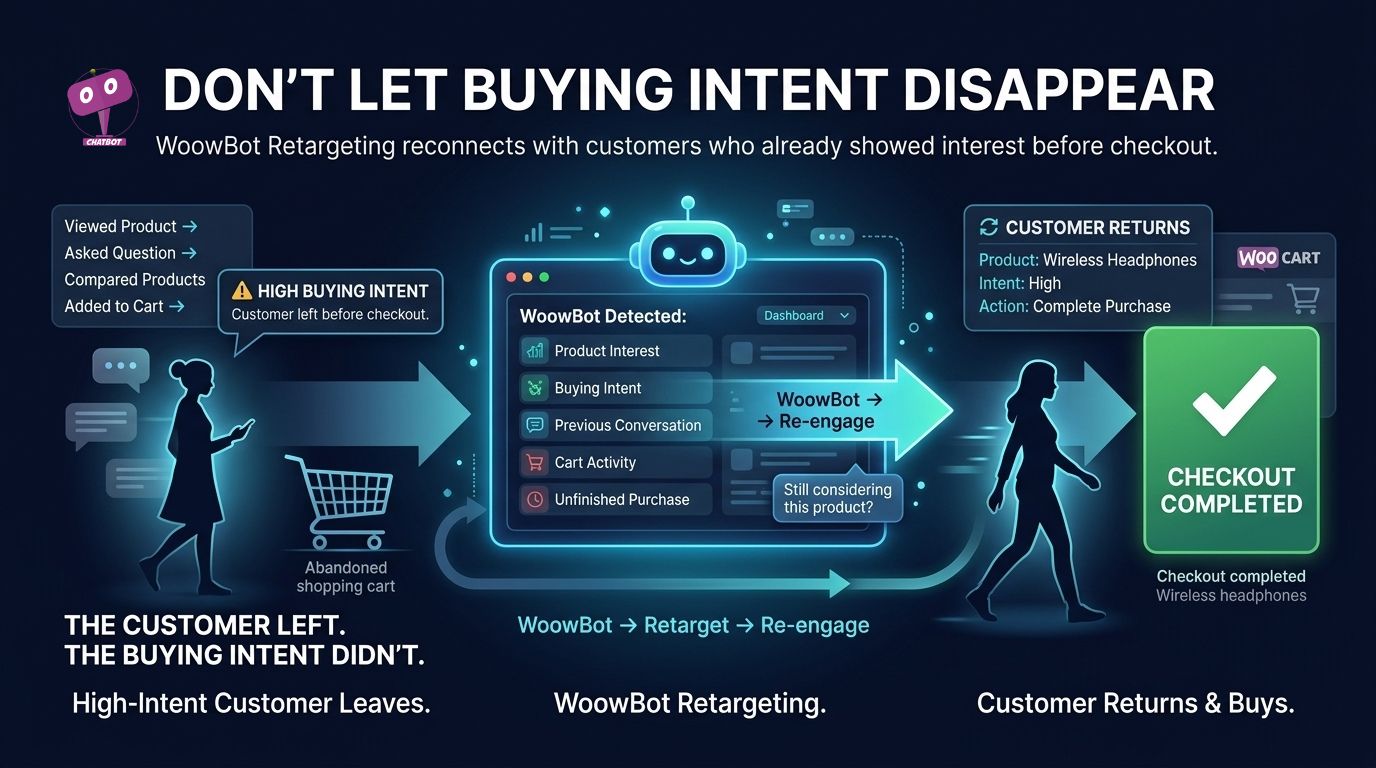
Getting a customer into a conversation does not guarantee a completed order.
WoowBot Retargeting addresses the gap between customer interest and customer action.
A visitor may ask five questions, compare three products, provide an email address, and still leave.
That customer should not be treated exactly like a visitor who bounced after two seconds.
WoowBot’s official product material describes visitor behavior tracking, exit-intent detection, and targeted offers as part of its conversion workflow.
What Can WoowBot Retargeting Do With a Customer Who Leaves?
A practical WooCommerce workflow could be:
Product viewed → WoowBot conversation → Product comparison → Buying objection → Exit → WoowBot retargeting → Return visit → Checkout
The strongest retargeting strategy does not simply say:
“Come back!”
The strongest WoowBot retargeting strategy connects the follow-up message to the customer’s demonstrated interest.
How Can WoowBot Use Different Offers for Different Buying Signals?
WoowBot can support different recovery strategies depending on the customer’s conversation.
| WoowBot signal | WoowBot follow-up strategy |
| Product comparison | Comparison-focused message |
| Price objection | Relevant discount or lower-priced alternative |
| Shipping concern | Shipping clarification |
| Product compatibility concern | Compatibility information |
| Cart abandonment | Cart recovery |
| High quantity | Bulk-purchase assistance |
| Product unavailable | Availability notification |
| Accessory interest | Cross-sell recommendation |
WoowBot makes the conversation itself part of the retargeting logic.
Can WoowBot Retargeting Increase the Value of Existing Traffic?
Suppose a WooCommerce store receives 30,000 visitors per month.
Suppose 900 visitors demonstrate meaningful purchase intent through product interaction or WoowBot conversations.
If 120 of those visitors purchase initially and WoowBot-supported follow-up recovers another 30 orders:
30 recovered orders × $80 average order value = $2,400 recovered revenue.
The model is illustrative, but the measurement framework is practical.
WooCommerce stores can separately track:
Initial orders + WoowBot-assisted orders + recovered orders + lead value + support savings.
How Do WoowBot Conversational Forms, Live Chat, and Retargeting Create One Sales Loop?
WoowBot becomes significantly more useful when the three pillars work as one customer journey.
| WoowBot pillar | Primary job | Useful KPI |
| WoowBot Conversational Forms | Capture and qualify intent | Form completion rate |
| WoowBot Live Chat | Resolve purchase objections | Assisted conversion rate |
| WoowBot Retargeting | Recover lost intent | Recovered-order rate |
| WoowBot Product Search | Improve product discovery | Product click-through rate |
| WoowBot Recommendations | Improve product matching | Average order value |
WoowBot Conversational Forms capture structured information. WoowBot Live Chat handles uncertainty. WoowBot Retargeting reconnects qualified visitors.
That creates a measurable sequence rather than a collection of disconnected chatbot features.
How Much Can WoowBot Cost When AI APIs Are Involved?
WoowBot licensing and AI API usage should be treated as separate operating costs.
WoowBot can integrate with external AI services, while AI providers separately charge according to their own usage and pricing models. WoowBot documentation specifically notes that API costs depend on response length and model selection.
A useful operating formula is:
Monthly AI cost = AI requests × average input cost + AI requests × average output cost
A more practical store-level formula is:
AI cost per order = monthly AI API spend ÷ WoowBot-assisted orders
For example:
$30 AI API spend ÷ 150 assisted orders = $0.20 AI cost per assisted order.
That number is much more useful than looking only at the total API bill.
How Can WoowBot Reduce Unnecessary AI Token Consumption?
WoowBot administrators can control AI costs by reducing unnecessary prompt and response volume.
Useful controls include:
- WoowBot: Avoid sending unnecessary product catalog data with every request.
- WoowBot: Avoid excessive conversation-history payloads.
- WoowBot: Limit maximum response tokens where appropriate.
- WoowBot: Use deterministic responses for simple recurring questions.
- WoowBot: Monitor requests per visitor.
- WoowBot: Monitor tokens per conversation.
- WoowBot: Monitor average response size.
- WoowBot: Monitor AI spend per day.
- WoowBot: Monitor AI spend per assisted order.
WoowBot documentation also emphasizes keeping API keys secret and preventing client-side exposure.
Why Should Developers Treat WoowBot Performance as a WordPress Architecture Problem?
WoowBot performance depends on more than chatbot JavaScript.
A WooCommerce store already has PHP execution, database queries, object caching, page caching, third-party scripts, payment systems, product queries, analytics, and other plugins.
WoowBot adds conversational requests and potentially external AI requests to that environment.
The correct engineering question is not:
“Does WoowBot use server resources?”
Every dynamic WordPress feature uses resources.
The correct question is:
“How much additional work does WoowBot perform per customer interaction, and how is the work isolated from the checkout path?”
What Should Developers Monitor Around WoowBot?
WoowBot developers should monitor PHP execution time, database query volume, external API latency, webhook latency, memory usage, error rates, and request volume.
A high-traffic WooCommerce store should also test WoowBot during realistic peak traffic rather than testing WoowBot only on a low-traffic staging website.
WoowBot can fit into high-traffic WooCommerce architectures, but scaling decisions should follow measured workload data rather than assumptions.
What Should Developers Do About WoowBot Privacy and GDPR?
WoowBot privacy architecture should follow data minimization, purpose limitation, access control, retention policies, and applicable GDPR requirements.
WoowBot deployments should document:
- WoowBot: What customer information is stored in WordPress.
- WoowBot: What customer information is sent to external AI providers.
- WoowBot: What information is transmitted through webhooks.
- WoowBot: How long conversation data is retained.
- WoowBot: Which WordPress roles can access conversation data.
- WoowBot: How deletion requests are handled.
- WoowBot: Which external processors receive customer information.
WoowBot administrators should avoid collecting sensitive personal information unless the information has a legitimate operational purpose and appropriate legal basis.
WoowBot deployments serving European customers should evaluate consent requirements, processor relationships, international transfers, privacy notices, and deletion workflows with qualified legal guidance.
What Should Developers Do About Historical WoowBot Security Patches?
WoowBot security should be evaluated using the current release, current dependencies, current vendor documentation, WordPress security practices, and current security advisories.
A historical “security improvement” entry should not automatically be interpreted as proof of a specific vulnerability, severity, exploit path, or affected version.
WoowBot administrators should update supported versions, maintain backups, use HTTPS, apply least-privilege WordPress roles, monitor malware, and test updates in staging where practical.
WoowBot administrators should never keep an outdated WoowBot release simply because an old installation appears stable.
How Can WoowBot Webhooks Avoid Adding Latency to Customer Conversations?
WoowBot webhook latency depends on DNS resolution, network routing, TLS negotiation, endpoint processing, external API calls, and receiving-server capacity.
WoowBot can send individual conversational-form submissions to specific webhook URLs, allowing form data to move into external systems.
A production architecture should therefore separate the customer-facing response from slow back-office processing.
A strong pattern is:
WoowBot → authenticated webhook → queue → worker → CRM/API/database
The webhook should acknowledge quickly.
The worker can then handle:
- WoowBot: CRM synchronization.
- WoowBot: Email notifications.
- WoowBot: Analytics processing.
- WoowBot: Lead enrichment.
- WoowBot: Marketing automation.
WoowBot developers should use short timeouts, authentication, retries with exponential backoff, idempotency keys, structured logging, and failure monitoring for production webhook integrations.
Can WoowBot Really Replace Guesswork With Customer Intelligence?
WoowBot can turn customer conversations into a practical source of WooCommerce business intelligence.
WoowBot Conversational Forms can reveal what customers want.
WoowBot Live Chat can reveal why customers hesitate.
WoowBot Retargeting can reveal how much purchase intent can be recovered after visitors leave.
WoowBot product questions can reveal missing information.
WoowBot compatibility questions can reveal documentation gaps.
WoowBot pricing questions can reveal price sensitivity.
WoowBot quantity questions can reveal bulk-buying opportunities.
WoowBot repeated product requests can reveal potential inventory demand.
The resulting loop is simple:
Customer question → WoowBot intent signal → WoowBot recommendation → WoowBot objection handling → WoowBot lead capture → WoowBot retargeting → WooCommerce checkout → WoowBot conversation data → Better future customer experience.
WoowBot does not need every conversation to produce an immediate order to create measurable value.
WoowBot can create value through incremental revenue, recovered orders, qualified leads, higher average order value, cross-sells, and reduced repetitive support workload.
The strongest WoowBot implementation measures all of those outcomes instead of measuring chatbot conversations alone.
FAQ
WoowBot drives WooCommerce checkouts by turning customer questions into buying-intent signals, product recommendations, qualified leads, real-time objection handling, and follow-up opportunities.
WoowBot connects Conversational Forms, Live Chat, and WooCommerce Retargeting, allowing stores to move more shoppers from product discovery to checkout using conversation data.
WoowBot can identify what customers want, what prevents customers from buying, what products customers compare, and what information customers need before checkout, turning customer questions into structured commercial signals.
WoowBot can increase the effective conversion rate by assisting in product discovery, objection handling, and follow-up, potentially leading to additional orders and revenue for the store.
WoowBot can turn repeated customer questions into actionable WooCommerce insights related to price sensitivity, compatibility concerns, product variation demand, purchase quantity, product demand, and more.
WoowBot Conversational Forms replace traditional static forms with progressive conversations that support conditional conversations, lead capture, and database storage based on the visitor's answers.
WoowBot Live Chat provides a conversational route through uncertainty for shoppers, addressing questions about compatibility, specifications, availability, shipping, returns, and more that may not be covered on product pages.
WoowBot Retargeting can support strategies to reconnect with visitors who have demonstrated meaningful buying intent but did not complete a purchase, offering targeted offers and tracking visitor behavior for conversion purposes.