By using Instagram chatbot addon with WoowBot Pro you can automate your instagram messaging. Usually, you would have a conversation with another human on Instagram, but with chatbots, you are not talking with another human, but with a computer.
To setup Instagram chatbot, you need to install WoowBot Pro & Instagram Chatbot addon into your wordpress setup and also you need to have an Instagram Business Account connected with a facebook page.
So first of all you need to create a Instagram Business account if you don’t have one. You can follow this article to create a instagram business account.
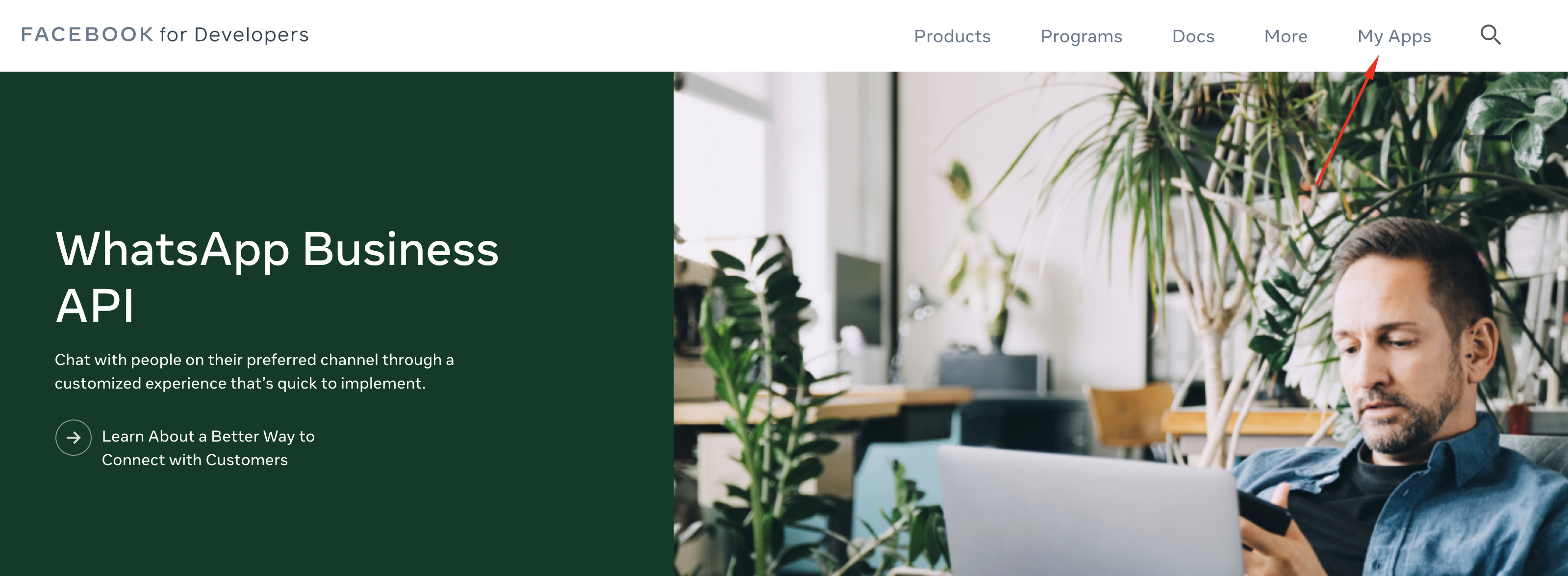
Now you are good to go to setup the Facebook App for Instagram Graph API. To do that please go to https://developers.facebook.com/ and login.
Then please click on the My App menu.
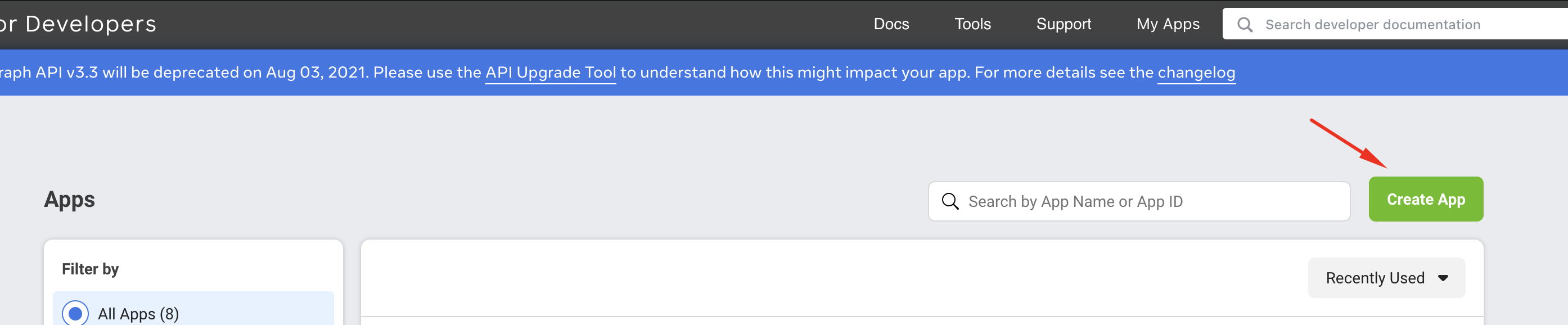
Then click on Create App.
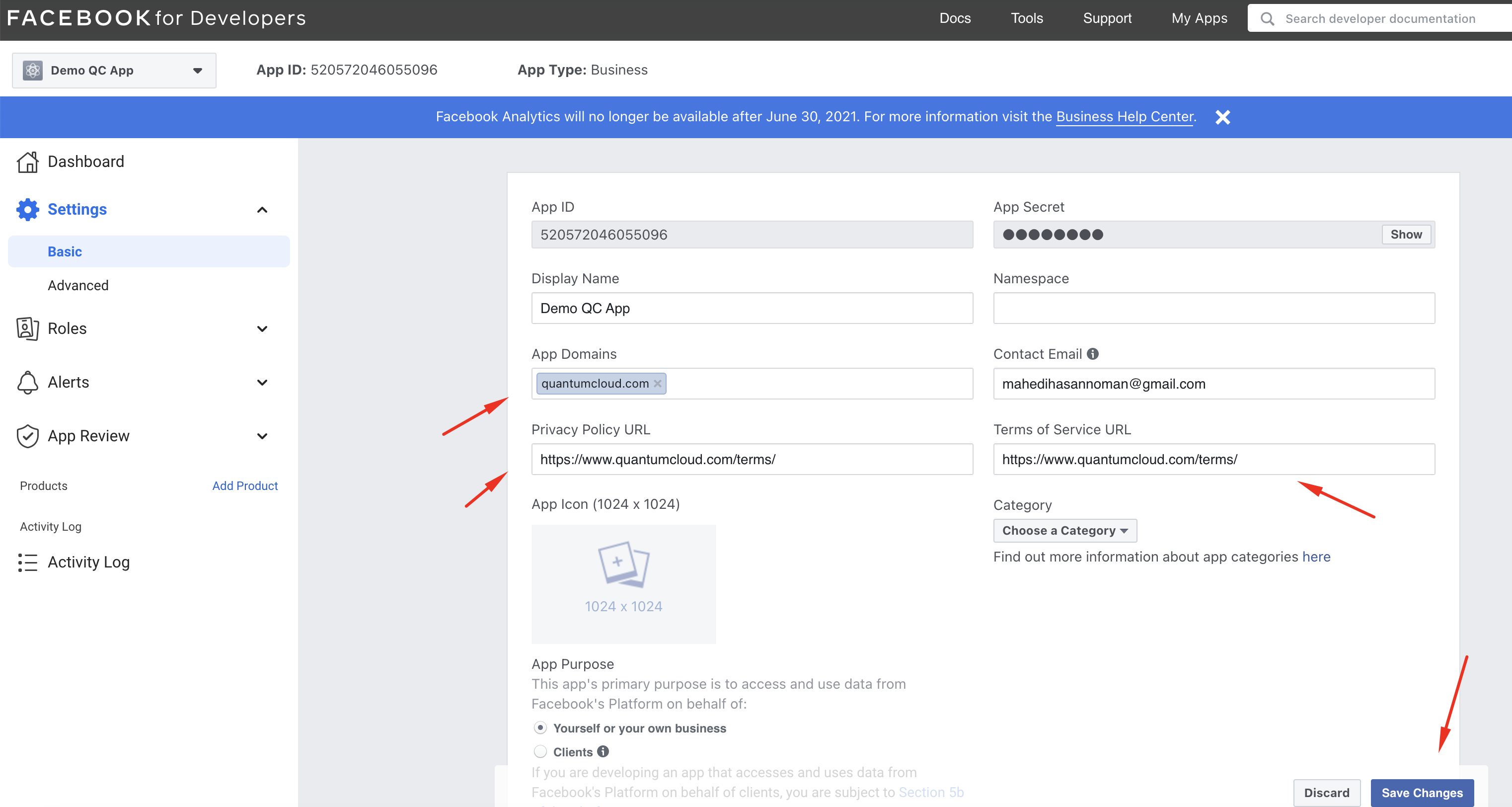
After that please follow the steps to create a Facebook App and after created you would be redirect to the App dashboard page. Then you need to go to Settings > Basic page and add the following information.
App Demain.
Privacy Policy
Terms of Service
Then save changes
See the screenshot below:
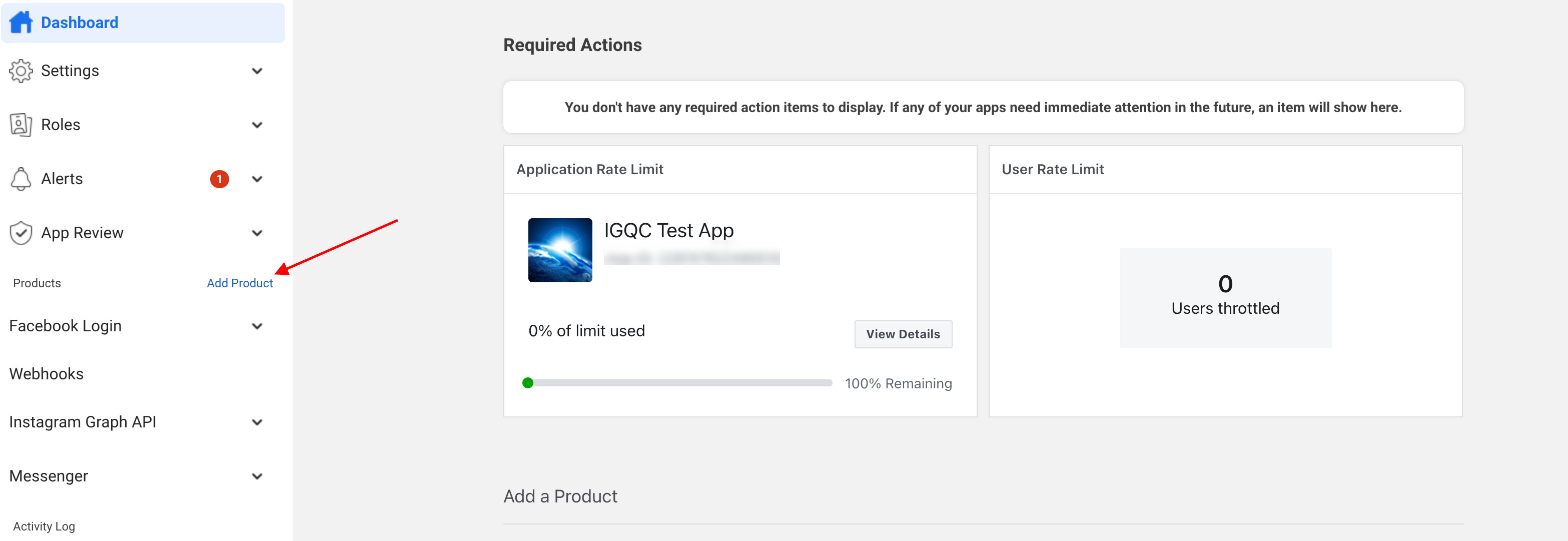
After you are done with the Basic settings you have add products in your facebook app. In order to do that please click on the “Products” button from left menu.
Then click on the setup button for “Webhooks”, “Instagram Graph API” & “Messenger” product.
Products
Webhooks
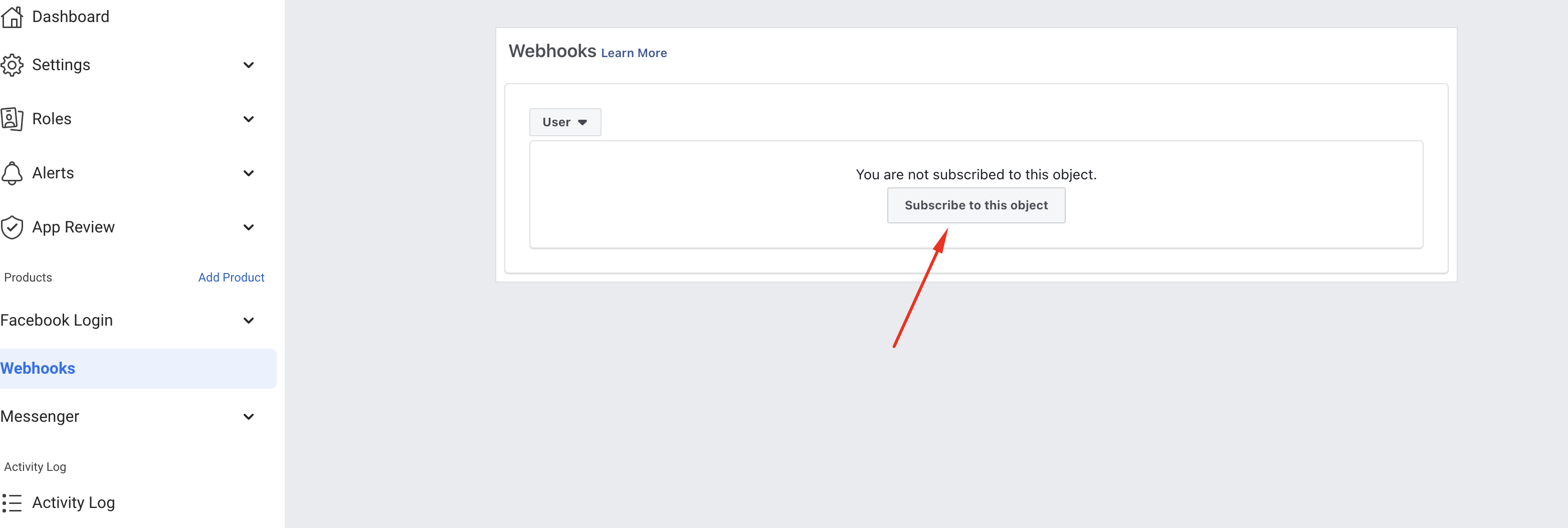
To setup webhooks please go to the webhooks page from left menu.
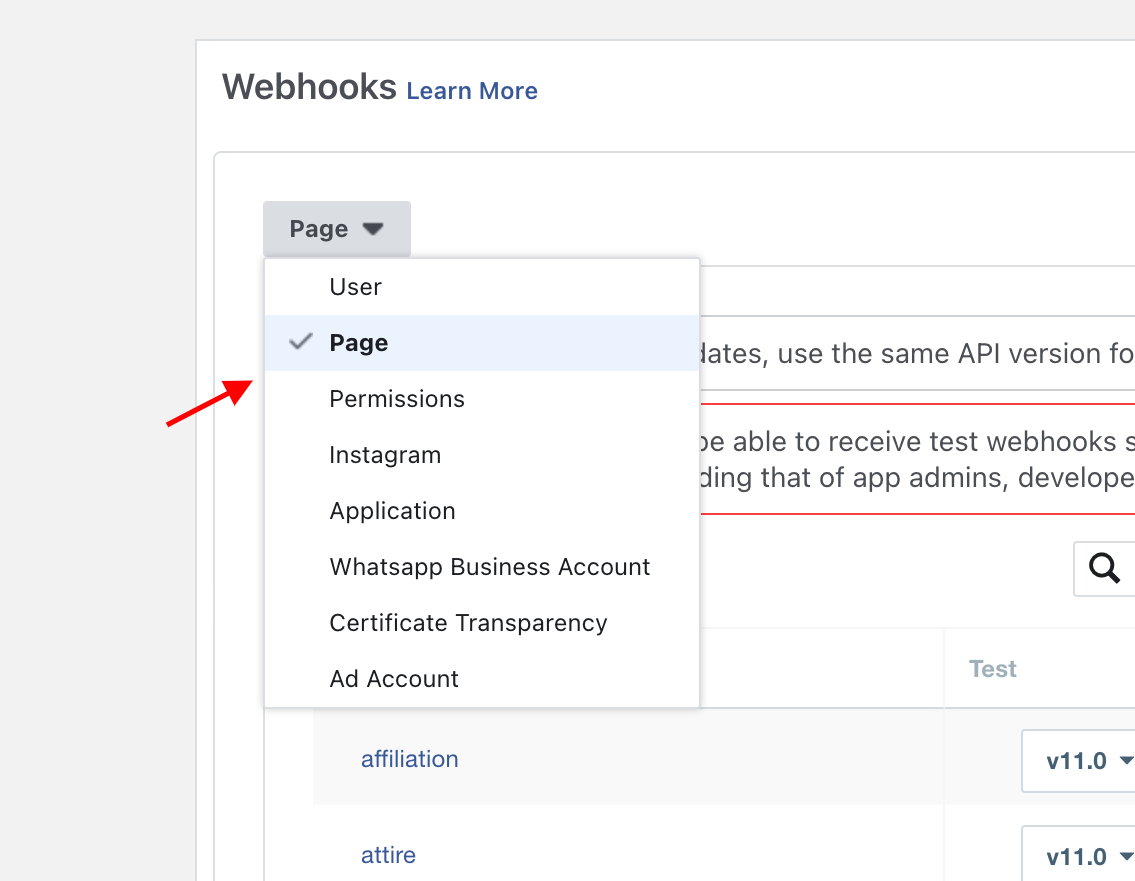
Here you need to subscribe to couple more objects. So let’s begin with “User” object which is selected by default from top dropdown. Click on the click on the subscribe to this object.
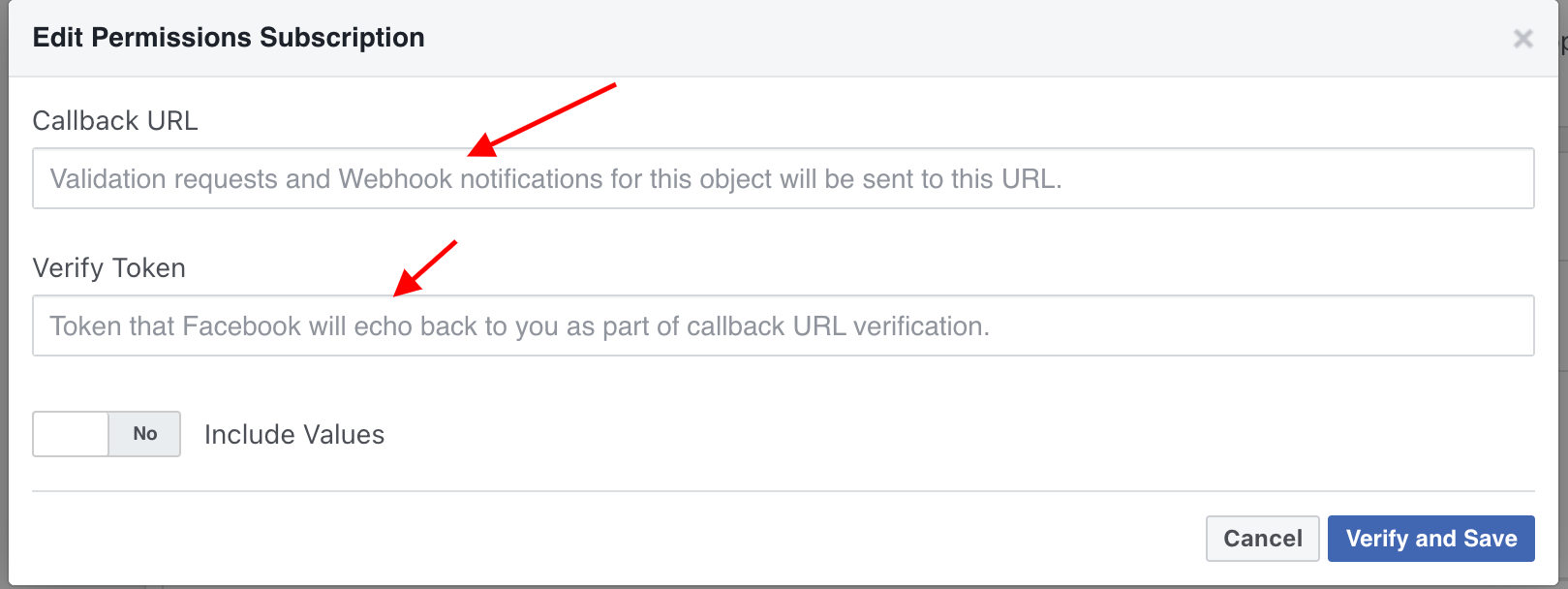
After that you will see a popup where you need to put callback url & verify token like the below screenshot.
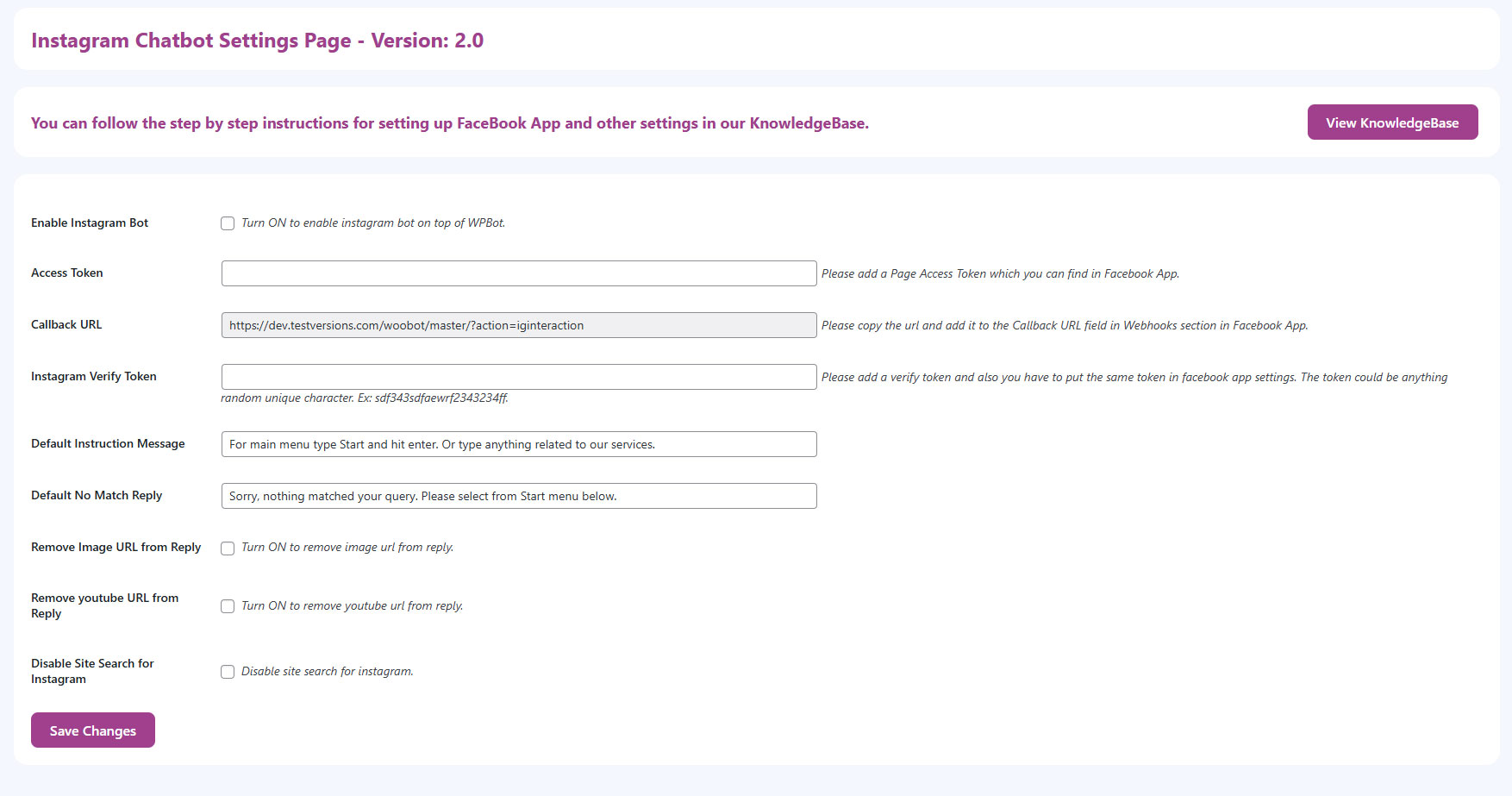
For Callback URL, Please go to WordPress Dashboard > Instagram Chatbot page and take the value for Callback URL field and add it to the Callback URL field in Facebook APP Webhook setup page.
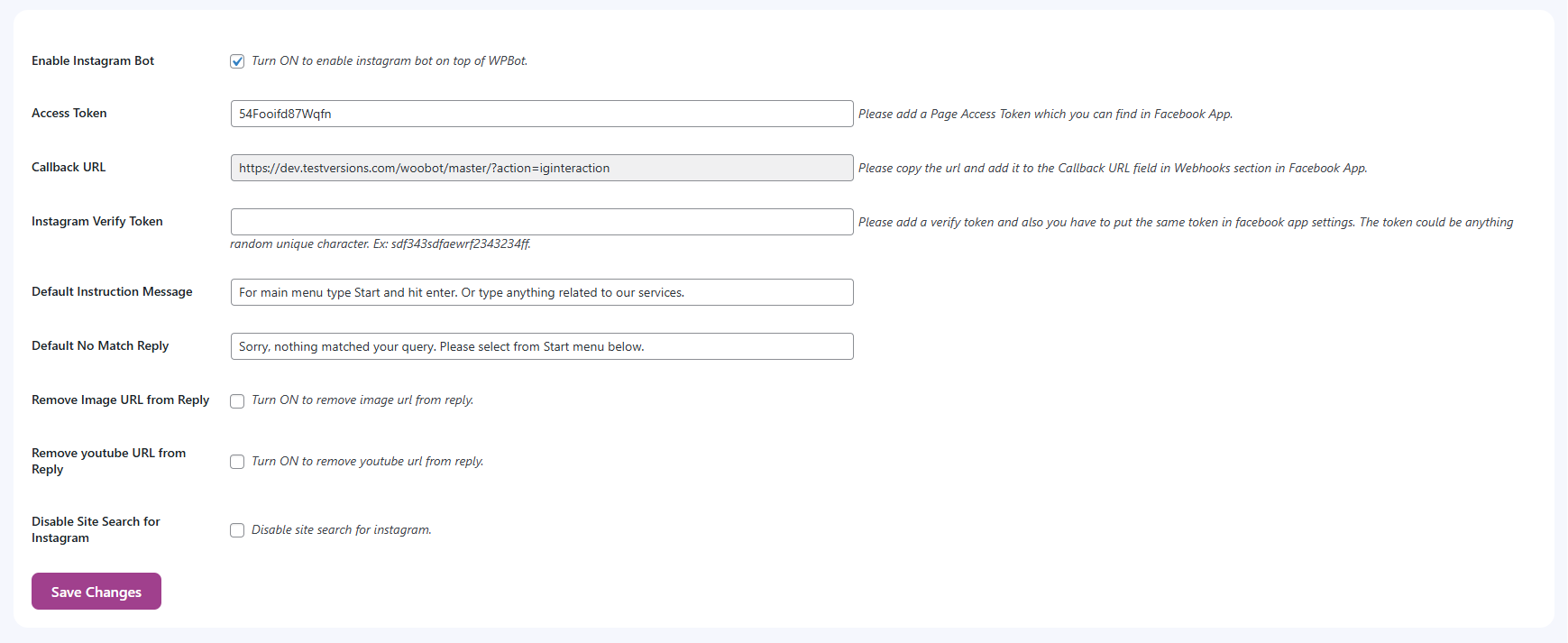
For Verify Token, again go to WordPress Dashboard > Instagram Chatbot page and put a random unique text in the Instagram Verify Token field and Enable the checkbox for Instagram Bot then hit save button.
Now add the same verify token value in Facebook APP Webhook setup page and click Verify and Save button. If everything is okay then it will be verified without any issue otherwise you will see a feedback why the verification is failed.
Now you need to subscribe for page object as well in same way by selecting “page” from above dropdown.
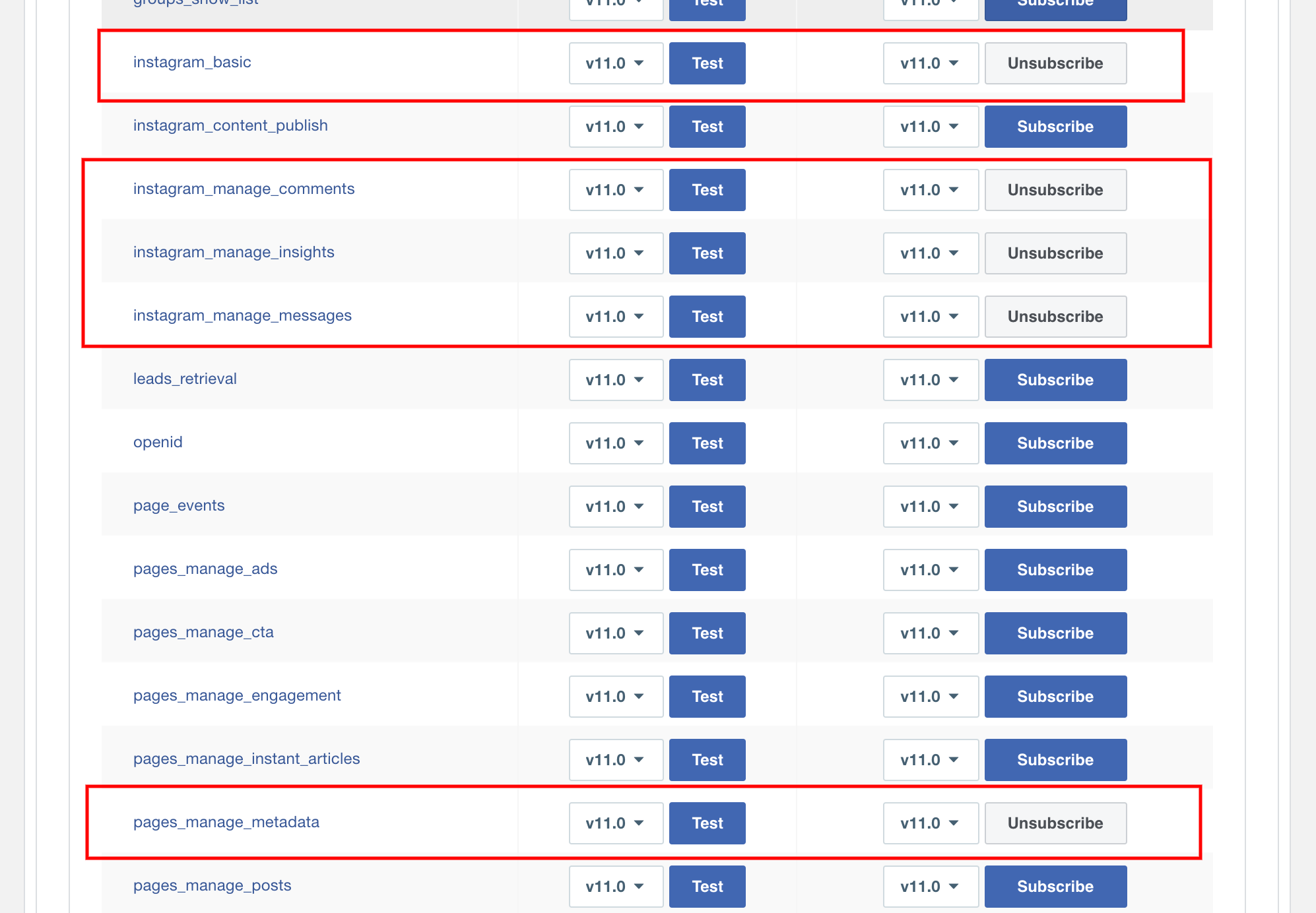
Also subscribe to Permissions object same way and you need to make sure you subscribed for the following below permissions.
instagram_basic
instagram_manage_comments
instagram_manage_insights
instagram_manage_messages
pages_manage_metadata
Also you can learn more about webhook permissions in this article.
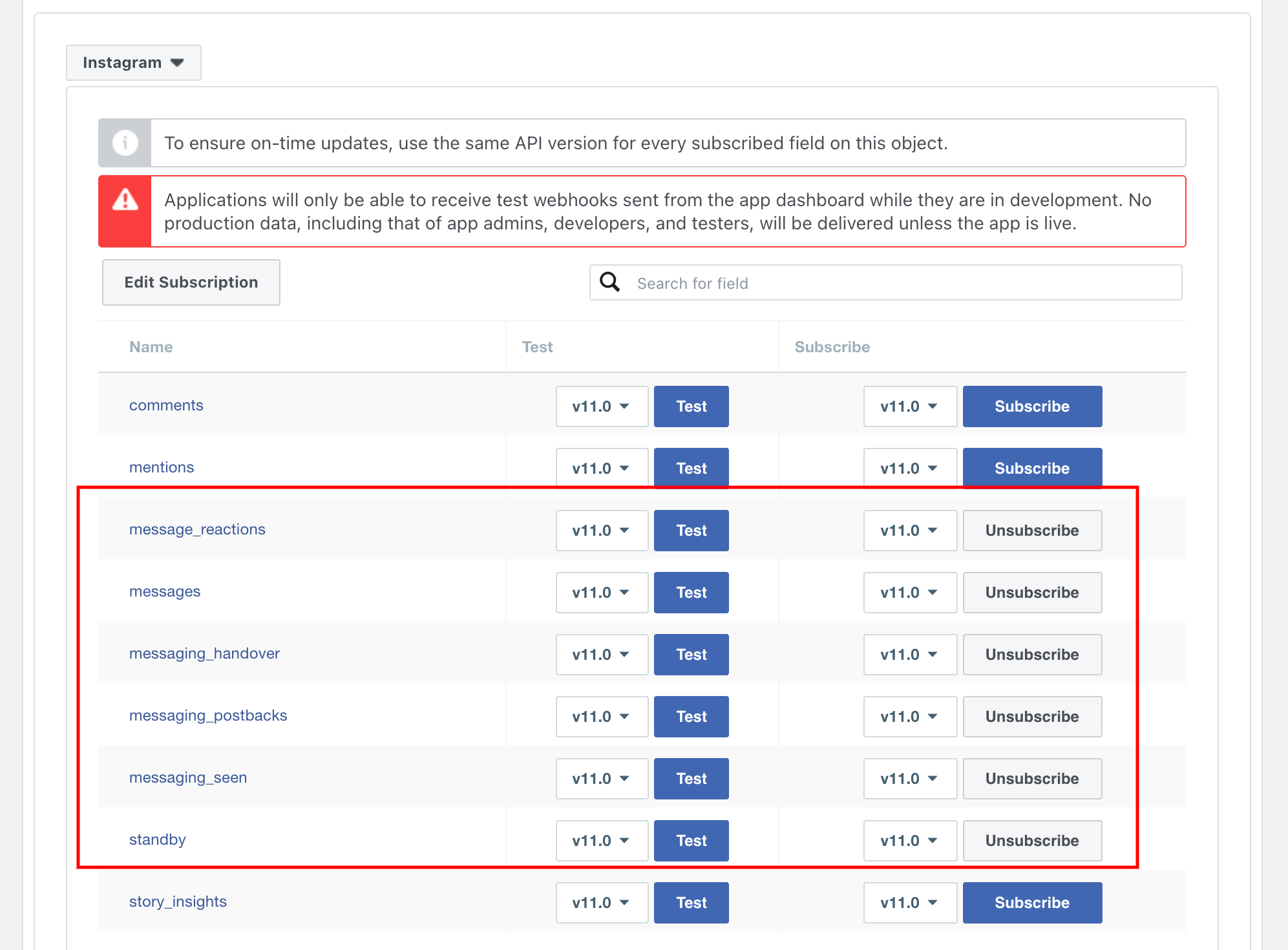
After that you need to subscribe to Instagram object as well by following the same procedure that you have done for above objects.
For Instagram object you need to also subscribe to the following field that is showing on the below screenshot.
That is all you need to setup for Webhook.
Instagram Graph API
You do not have to do anything for Instagram Graph API. So you can leave it as it is.
Messanger
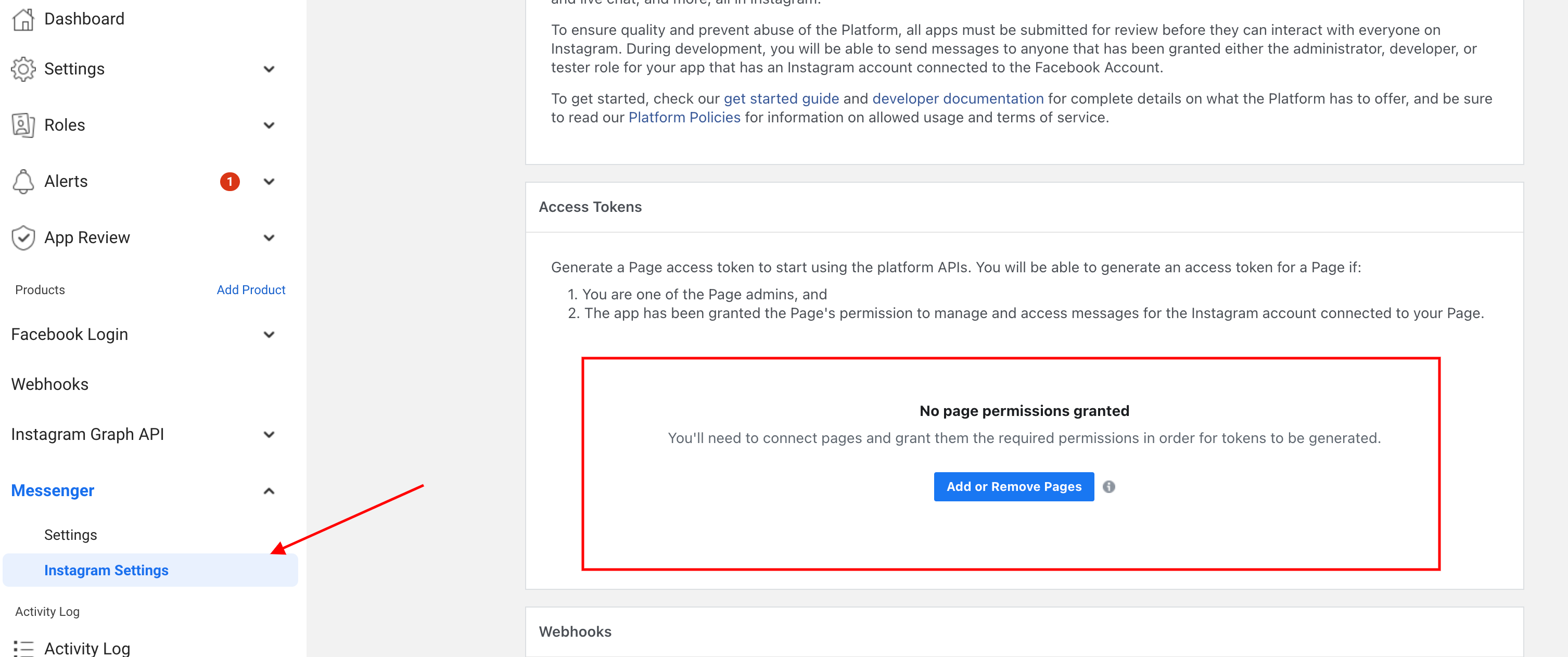
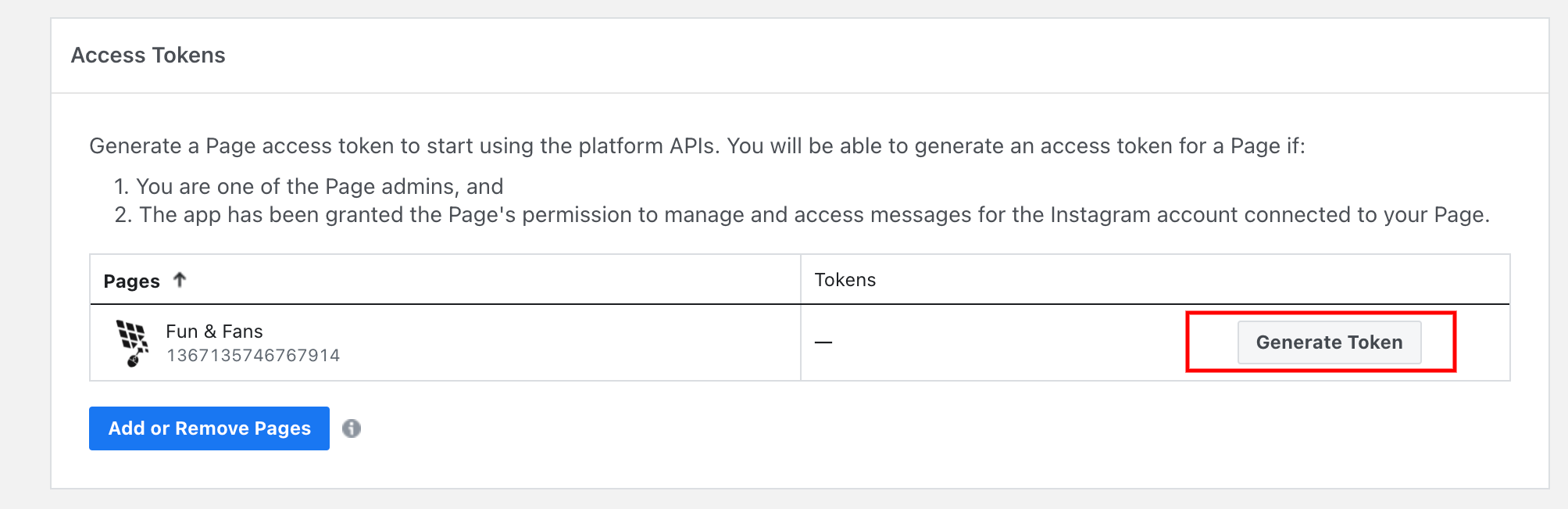
Now you need to setup Messenger for Instagram. So please go to Messenger > Instagram Setup page and click on the “Add or Remove Pages” button from Access Token section.
Now you need to follow the instructions on the FB popup and select the Instagram Business account and connected FB page. Once FB page has been added you need to generate token by clicking on the Generate Token button.
You need to copy the Token add it the Page access token field from WordPress Dashboard > Instagram Chatbot page and hit the Save Changes button.
That is all for Messenger setup for Instagram.
FB App Permissions
Permissions provide a way for your app to access data from Facebook.
The following permission is needed for the Facebook App to work with Instagram Chatbot.
Some of the above permissions will require approval for Facebook APP live mode. If your app is in development mode then the permissions will not require approval.
Lorem ipsum dolor sit amet, consectetur adipiscing elit. Praesent euismod dui vel magna fringilla sollicitudin. Pellentesque elementum tellus a faucibus vestibulum. Pellentesque eleifend tortor nunc, vitae pellentesque leo interdum finibus. Donec faucibus magna nec sagittis accumsan. Nulla fermentum velit massa, ac varius massa pulvinar eu. Nulla facilisi. Aenean mauris massa, cursus vel varius a, bibendum vitae felis. Vestibulum vulputate porttitor porta. Suspendisse elementum turpis in velit feugiat, ac bibendum nisl vehicula. In consequat libero ac maximus blandit. Integer vel dictum purus. Donec luctus enim interdum lacinia ornare. Nam vitae ultrices nisl, non posuere enim. Class aptent taciti sociosqu ad litora…
Lorem ipsum dolor sit amet, consectetur adipiscing elit. Praesent euismod dui vel magna fringilla sollicitudin. Pellentesque elementum tellus a faucibus vestibulum. Pellentesque eleifend tortor nunc, vitae pellentesque leo interdum finibus. Donec faucibus magna nec sagittis accumsan. Nulla fermentum velit massa, ac varius massa pulvinar eu. Nulla facilisi. Aenean mauris massa, cursus vel varius a, bibendum vitae felis. Vestibulum vulputate porttitor porta. Suspendisse elementum turpis in velit feugiat, ac bibendum nisl vehicula. In consequat libero ac maximus blandit. Integer vel dictum purus. Donec luctus enim interdum lacinia ornare. Nam vitae ultrices nisl, non posuere enim. Class aptent taciti sociosqu ad litora…
Lorem ipsum dolor sit amet, consectetur adipiscing elit. Praesent euismod dui vel magna fringilla sollicitudin. Pellentesque elementum tellus a faucibus vestibulum. Pellentesque eleifend tortor nunc, vitae pellentesque leo interdum finibus. Donec faucibus magna nec sagittis accumsan. Nulla fermentum velit massa, ac varius massa pulvinar eu. Nulla facilisi. Aenean mauris massa, cursus vel varius a, bibendum vitae felis. Vestibulum vulputate porttitor porta. Suspendisse elementum turpis in velit feugiat, ac bibendum nisl vehicula. In consequat libero ac maximus blandit. Integer vel dictum purus. Donec luctus enim interdum lacinia ornare. Nam vitae ultrices nisl, non posuere enim. Class aptent taciti sociosqu ad litora…
X
Let's chat if you need any help finding the right product or need support.
FAQEmail SubscriptionProduct SearchCatalogOrder Status
×
Complete Payment
Manage Cookie Consent
To provide the best experiences, we use technologies like cookies to store and/or access device information.
Functional
Always active
The technical storage or access is strictly necessary for the legitimate purpose of enabling the use of a specific service explicitly requested by the subscriber or user, or for the sole purpose of carrying out the transmission of a communication over an electronic communications network.
Preferences
The technical storage or access is necessary for the legitimate purpose of storing preferences that are not requested by the subscriber or user.
Statistics
The technical storage or access that is used exclusively for statistical purposes.The technical storage or access that is used exclusively for anonymous statistical purposes. Without a subpoena, voluntary compliance on the part of your Internet Service Provider, or additional records from a third party, information stored or retrieved for this purpose alone cannot usually be used to identify you.
Marketing
The technical storage or access is required to create user profiles to send advertising, or to track the user on a website or across several websites for similar marketing purposes.