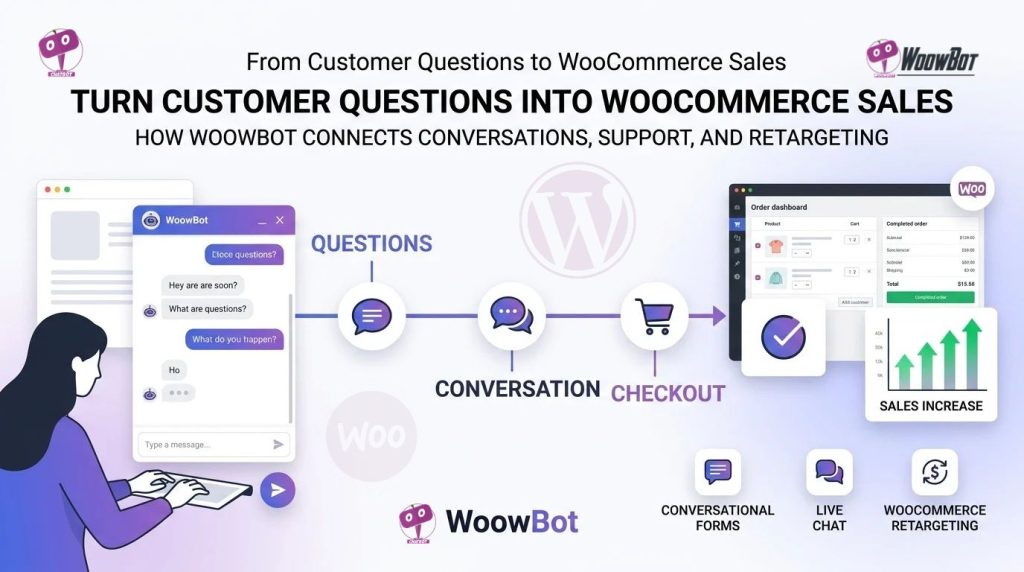
WoowBot drives WooCommerce checkouts by turning customer questions into buying signals, product discovery, lead capture, objection handling, human assistance, and follow-up actions through Conversational Forms, Live Chat, and WooCommerce Retargeting. WoowBot connects the conversation before checkout with the actions that can move a qualified shopper closer to a purchase.
Why Are WooCommerce Customer Questions More Valuable Than Most Store Owners Realize?
WoowBot can turn everyday WooCommerce customer questions into actionable commercial signals instead of treating customer questions as ordinary support requests.
WoowBot can identify questions about price, compatibility, size, availability, shipping, product differences, delivery time, discounts, and alternatives as signals of purchase intent.
WoowBot gives WooCommerce store owners a way to connect customer questions with product discovery, lead capture, human support, and retargeting.
A shopper asking, “Which model should I buy?” is already deeper in the buying journey than a shopper simply browsing a category page.
WoowBot can use that conversation as an opportunity to understand the shopper, recommend relevant WooCommerce products, answer objections, and create a next action.
What Does a WooCommerce Question Look Like When WoowBot Treats the Question as Sales Data?
WoowBot can interpret different customer questions as different commercial signals.
|
Customer question |
WoowBot signal |
Possible WooCommerce action |
|
“Which one should I choose?” |
Product comparison intent |
WoowBot recommends relevant products |
|
“Does this work with my device?” |
Compatibility intent |
WoowBot provides compatibility information |
|
“Do you have a cheaper option?” |
Price sensitivity |
WoowBot surfaces lower-priced alternatives |
|
“When will this arrive?” |
Delivery concern |
WoowBot provides shipping information |
|
“Can I get a discount?” |
Purchase objection |
WoowBot can guide the shopper toward an offer |
|
“Can someone help me?” |
High-touch intent |
WoowBot can transition the conversation toward Live Chat |
|
“I need 20 units.” |
High-value purchase intent |
WoowBot can capture the requirement through Conversational Forms |
WoowBot makes the important distinction between conversation volume and commercial intent.
WoowBot does not need thousands of conversations to become useful; WoowBot needs a practical process for identifying which conversations contain buying signals and which conversations require support rather than sales intervention.
Why Can’t Product Pages Answer Every Question a WooCommerce Shopper Has?
WoowBot fills conversational gaps that static WooCommerce product pages cannot always address efficiently.
WoowBot can help shoppers move from a broad requirement such as “I need something for outdoor use” toward a more specific product requirement through conversational questions.
WoowBot can also use product information, search functionality, and configured AI capabilities to help shoppers discover relevant products without forcing shoppers to navigate multiple category pages.
How Does WoowBot Turn Product Discovery Into a Conversation?
WoowBot can structure product discovery around the shopper’s actual requirement rather than forcing the shopper to understand the store’s category structure first.
WoowBot can ask questions about budget, intended use, preferred features, compatibility, quantity, or other relevant requirements.
WoowBot can then use the answers to narrow the product-selection process.
A practical WoowBot flow can look like this:
- WoowBot asks what the shopper needs.
- WoowBot identifies important requirements.
- WoowBot narrows relevant WooCommerce products.
- WoowBot answers product questions.
- WoowBot handles purchase objections.
- WoowBot captures qualified information when necessary.
- WoowBot connects the shopper with Live Chat when human assistance matters.
- WoowBot supports retargeting when a qualified shopper leaves before purchasing.
WoowBot turns product discovery from a passive browsing activity into an active buying conversation.
Why Are Conversational Forms More Useful Than Another Static Contact Form?
WoowBot Conversational Forms can replace a long, intimidating form with a guided conversation that collects information progressively.
WoowBot Conversational Forms can use conditional logic so different answers can produce different follow-up questions.
WoowBot Conversational Forms can support lead capture, contact requests, surveys, calculators, qualification workflows, and other structured interactions.
How Can WoowBot Conversational Forms Capture Buying Intent Before Checkout?
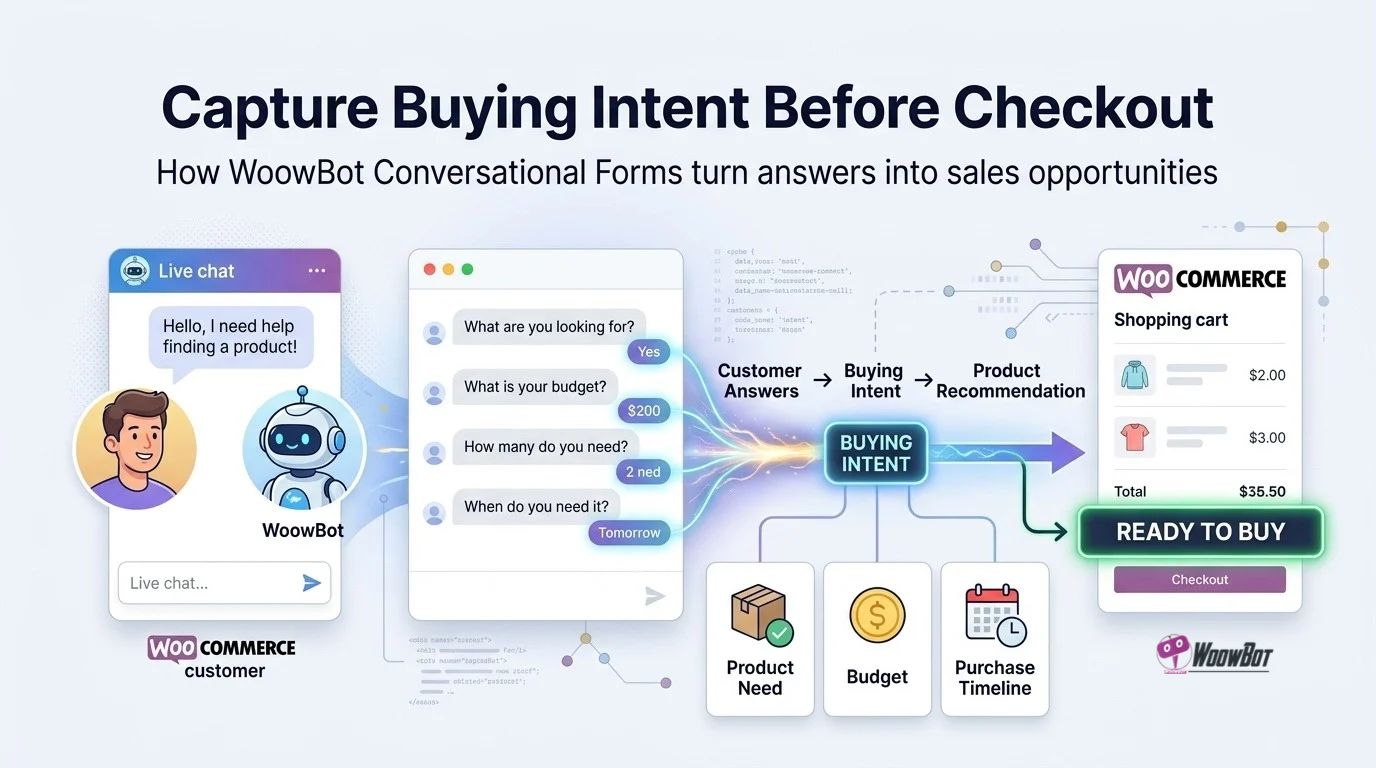
WoowBot Conversational Forms can ask a shopper for information at the moment when the information has commercial value.
WoowBot can ask a shopper what product category matters, what budget range matters, how many units are required, what problem needs solving, or when the purchase needs to happen.
WoowBot can then save structured responses instead of leaving valuable buying information buried inside an unstructured chat transcript.
For example, WoowBot can structure a B2B WooCommerce conversation around:
- WoowBot asks for required quantity.
- WoowBot asks for product category.
- WoowBot asks for required delivery date.
- WoowBot asks for budget range.
- WoowBot asks for business email.
- WoowBot sends the qualified submission into the configured workflow.
WoowBot gives the sales team structured information that can be more useful than a generic message saying, “Please contact me.”
Can WoowBot Use Conditional Questions Instead of Showing Every Field at Once?
WoowBot Conversational Forms can use conditional logic to avoid showing irrelevant questions to every shopper.
WoowBot can show a different question sequence when a shopper chooses one product category instead of another.
WoowBot can therefore create a shorter interaction for simple requirements while creating a deeper qualification flow for complex purchases.
Why Does Conditional Logic Matter for WooCommerce Conversion?
WoowBot conditional conversations can reduce unnecessary form fields and keep the shopper focused on the current buying decision.
WoowBot can use a simple rule such as Product Type → Requirement → Budget → Contact rather than presenting ten or fifteen unrelated fields immediately.
WoowBot can also create different paths for retail buyers, wholesale buyers, support requests, product recommendations, and other customer intents.
Why Does Live Chat Matter When AI Cannot Close the Conversation Alone?
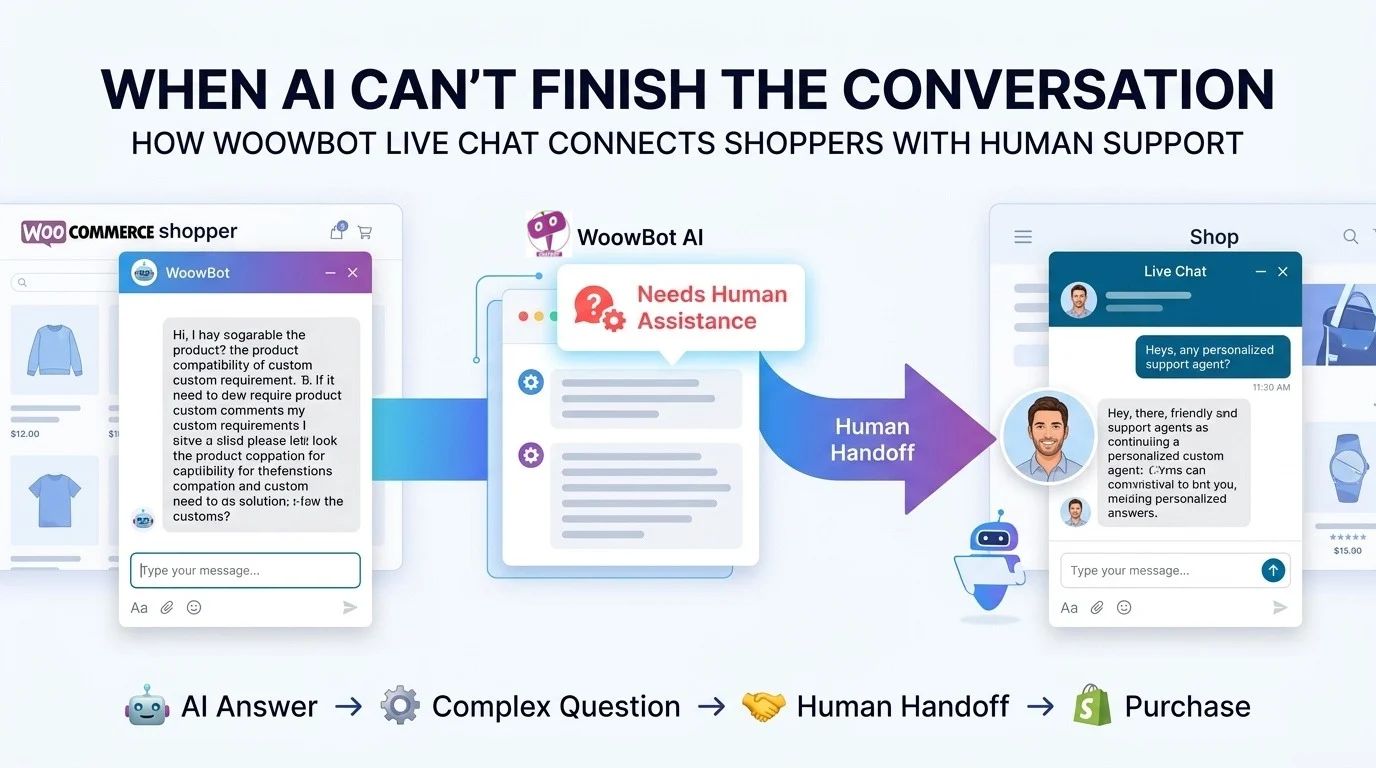
WoowBot Live Chat provides a human escalation path for conversations where automated answers are not enough.
WoowBot Live Chat can become important when a shopper has a complex compatibility question, high-value purchase, unusual requirement, negotiation request, or support issue.
WoowBot can therefore create a hybrid customer journey instead of forcing every customer interaction into either automation or manual support.
How Can WoowBot Combine AI Answers With Human Live Chat?
WoowBot can handle routine product questions while WoowBot Live Chat can provide a route toward human assistance for higher-complexity conversations.
WoowBot can answer questions such as product availability, basic product differences, common FAQs, and configured store information.
WoowBot Live Chat can then handle conversations where human judgment, account-specific information, or detailed sales assistance becomes more appropriate.
A practical WoowBot escalation model can look like this:
|
Shopper situation |
WoowBot action |
|
Simple product question |
WoowBot provides an automated answer |
|
Product comparison |
WoowBot helps compare relevant products |
|
Compatibility uncertainty |
WoowBot asks qualification questions |
|
High-value purchase |
WoowBot can route the shopper toward human assistance |
|
Complex support issue |
WoowBot Live Chat can involve a human agent |
|
Shopper leaves before purchase |
WoowBot Retargeting can support follow-up |
WoowBot makes Live Chat more useful when Live Chat becomes part of a larger conversion workflow rather than an isolated support widget.
What Happens When a Shopper Asks a Question but Leaves Without Buying?
WoowBot WooCommerce Retargeting addresses the gap between conversation and checkout.
WoowBot can identify the importance of a shopper interaction before the shopper disappears from the website.
WoowBot can use configured retargeting mechanisms to present targeted follow-up actions when an eligible visitor is leaving or has abandoned the purchase journey.
How Can WoowBot Turn Exit Intent Into Another Sales Opportunity?
WoowBot can detect exit behavior and use a configured offer or follow-up interaction to create another opportunity before the shopper leaves.
WoowBot can present a relevant message rather than allowing a qualified shopper to disappear silently.
WoowBot can make the exit interaction more useful when the message reflects the shopper’s previous intent.
For example, WoowBot can connect a shopper’s product interest with a relevant alternative, discount, assistance request, lead-capture form, or reminder.
WoowBot Retargeting becomes stronger when WoowBot understands why the shopper was interested instead of simply displaying the same generic popup to every visitor.
Why Is Retargeting More Powerful When WoowBot Knows the Conversation?
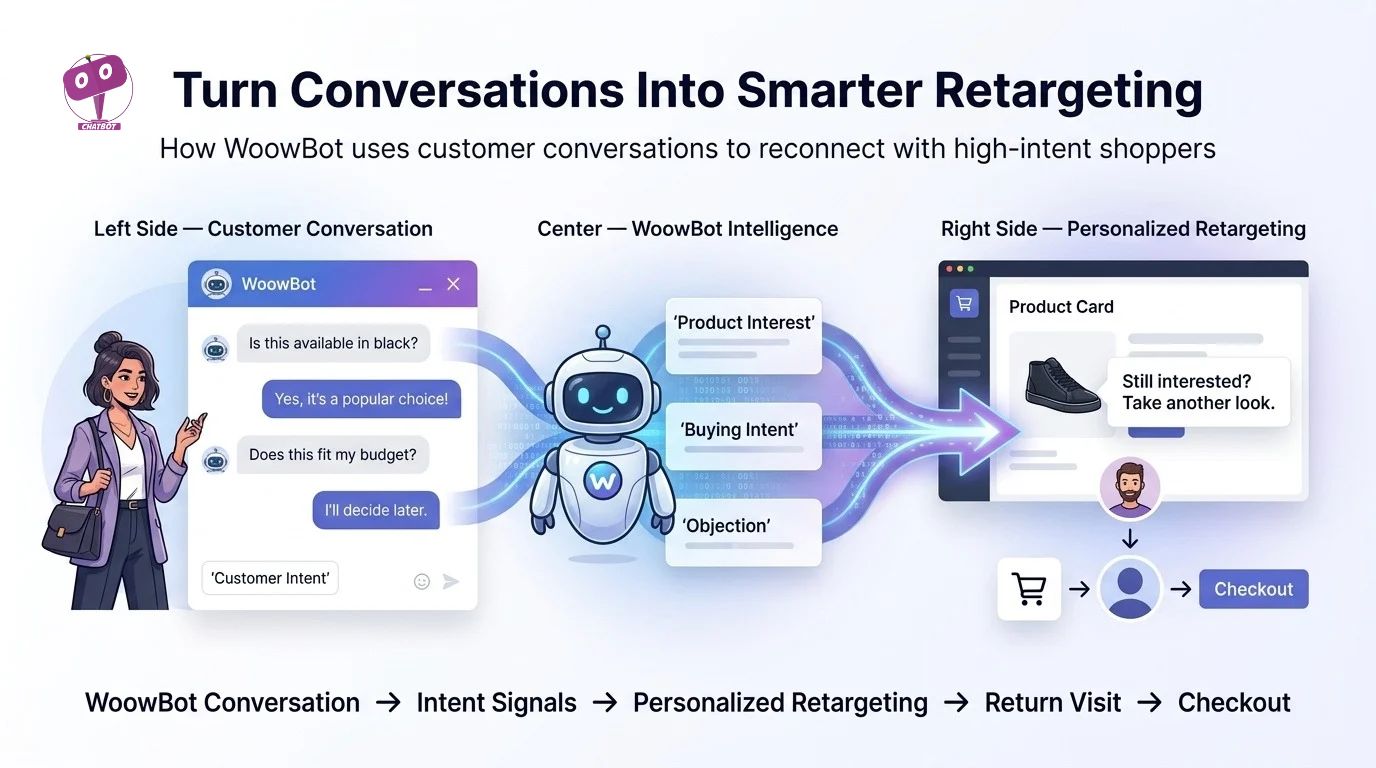
WoowBot can create more useful retargeting opportunities when WoowBot has contextual information about the shopper’s interaction.
WoowBot can distinguish a shopper who asked about price from a shopper who asked about compatibility.
WoowBot can also distinguish a shopper who requested human assistance from a shopper who only asked a general product question.
How Can WoowBot Connect Conversation Data With Retargeting?
WoowBot can use the conversation journey as the foundation for a follow-up strategy.
A WoowBot conversion sequence can look like:
Question → WoowBot Intent Detection → Product Recommendation → WoowBot Objection Handling → WoowBot Lead Capture → WoowBot Retargeting → Checkout
WoowBot makes each stage connected instead of treating chat, forms, and retargeting as unrelated marketing features.
What Does the WoowBot Conversion Funnel Look Like in Real Numbers?
WoowBot ROI should be calculated using incremental revenue, recovered orders, qualified leads, average order value, and support savings rather than chatbot message volume alone.
WoowBot ROI can be modeled with a simple formula:
WoowBot ROI = (Incremental Revenue + Recovered Revenue + Measurable Support Savings − WoowBot Costs − AI Usage Costs − Integration Costs) ÷ Total WoowBot Costs × 100
Consider a WooCommerce store receiving 20,000 monthly visitors.
Assume WoowBot contributes to an additional 0.3 percentage-point conversion rate.
The calculation becomes:
20,000 × 0.003 = 60 additional orders
If the average WooCommerce order value is $75, the incremental revenue becomes:
60 × $75 = $4,500/month
WoowBot does not guarantee the additional 60 orders because actual conversion impact depends on traffic quality, product-market fit, pricing, store UX, offer quality, implementation, and shopper behavior.
WoowBot provides a framework for measuring whether conversations contribute to measurable commercial outcomes.
How Should WooCommerce Store Owners Measure WoowBot Instead of Counting Chat Messages?
WoowBot performance should be measured against business outcomes rather than vanity metrics.
Useful WoowBot metrics include:
- WoowBot conversation-to-product-click rate
- WoowBot conversation-to-lead rate
- WoowBot conversation-to-checkout rate
- WoowBot recovered-cart revenue
- WoowBot assisted conversion value
- WoowBot average order value for assisted sessions
- WoowBot Live Chat escalation rate
- WoowBot Conversational Form completion rate
- WoowBot retargeting response rate
- WoowBot support deflection volume
WoowBot analytics become significantly more useful when store owners compare assisted sessions against comparable non-assisted sessions.
How Does WoowBot Compare With a Typical SaaS Chatbot Model?
WoowBot uses a WordPress-native approach, while many SaaS chatbot services operate through an external hosted application and recurring subscription structure.
WoowBot licensing and AI-provider usage should be considered separately because WoowBot provides the WordPress chatbot layer while external AI providers can introduce their own usage costs.
|
Cost or capability |
WoowBot |
Typical SaaS chatbot |
|
WordPress integration |
WoowBot is designed for WordPress |
SaaS integration varies |
|
WooCommerce workflows |
WoowBot supports WooCommerce-focused functionality |
SaaS capability varies |
|
Conversational Forms |
WoowBot supports Conversational Forms |
Plan-dependent |
|
Live Chat |
WoowBot provides Live Chat functionality |
Plan-dependent |
|
Retargeting |
WoowBot supports WooCommerce Retargeting workflows |
Plan-dependent |
|
AI provider cost |
WoowBot AI usage can involve external provider charges |
SaaS pricing may bundle or meter AI |
|
Hosting model |
WoowBot runs within WordPress |
SaaS runs primarily on provider infrastructure |
|
Data architecture |
WoowBot data handling depends on configuration |
SaaS data handling depends on provider |
|
Licensing |
WoowBot offers yearly and perpetual license options |
SaaS commonly uses recurring plans |
WoowBot pricing should be evaluated against total operating cost rather than license price alone.
WoowBot deployments using external AI services should also budget for AI API consumption, because AI provider billing is separate from WordPress plugin licensing.
How Much Can WoowBot Cost When AI API Usage Is Added?
WoowBot AI costs depend on the configured AI provider, selected model, prompt size, response size, request volume, and provider pricing.
WoowBot administrators should therefore treat AI usage as a variable operating cost rather than assuming that a plugin license automatically includes unlimited third-party AI inference.
WoowBot deployments can reduce unnecessary AI consumption by limiting excessive context, avoiding unnecessarily large responses, using appropriate models for simple tasks, and routing deterministic questions through non-AI workflows when practical.
How Can WoowBot Keep OpenAI, Gemini, and DeepSeek Token Costs Under Control?
WoowBot administrators should separate plugin licensing costs from AI inference costs when calculating WooCommerce chatbot ROI.
WoowBot deployments using OpenAI should monitor API usage through the relevant OpenAI account and project controls.
WoowBot deployments using Gemini should monitor Google AI usage through the relevant Google billing and quota controls when Gemini is configured.
WoowBot deployments using DeepSeek should monitor DeepSeek-related usage through the configured integration or routing provider.
WoowBot administrators should use request limits, sensible conversation history, concise system instructions, appropriate model selection, and usage monitoring to prevent unexpected AI expenditure.
WoowBot can also use OpenRouter configurations where supported, allowing different models and providers to be managed through a routing layer.
How Does WoowBot Fit Into a WooCommerce Sales Workflow?
The complete WoowBot workflow can be organized into five stages:
- WoowBot discovers intent.
- WoowBot helps shoppers find relevant products.
- WoowBot captures qualified information.
- WoowBot escalates complex conversations through Live Chat.
- WoowBot reconnects with eligible shoppers through Retargeting.
WoowBot creates more value when every stage has a measurable business objective.
Why Should WooCommerce Store Owners Stop Treating Customer Questions as Support Tickets?
WoowBot can turn customer questions into a source of product, pricing, compatibility, and buying-intent information.
WoowBot conversations can reveal where shoppers become confused, which products generate repeated questions, which objections prevent purchases, and which requirements are not clearly addressed by existing product pages.
WoowBot can therefore create a feedback loop between customer conversations and WooCommerce optimization.
WoowBot can turn one recurring question into several actions:
- WoowBot can improve a product description.
- WoowBot can create a new FAQ.
- WoowBot can identify a missing product attribute.
- WoowBot can trigger a Conversational Form.
- WoowBot can escalate the conversation to Live Chat.
- WoowBot can create a retargeting opportunity.
- WoowBot can expose a recurring objection for sales analysis.
WoowBot becomes more valuable when WooCommerce store owners use conversation data to improve the entire customer journey.
What Should Developers Check Before Deploying WoowBot on a High-Traffic WooCommerce Store?
WoowBot developers should treat production deployment as an application architecture exercise rather than a simple plugin installation.
WoowBot production checks should include:
- WoowBot server resource usage under realistic concurrent traffic
- WoowBot database growth from stored conversations and form submissions
- WoowBot external AI API consumption
- WoowBot webhook timeout behavior
- WoowBot webhook retry and failure handling
- WoowBot WordPress capability permissions
- WoowBot HTTPS configuration
- WoowBot backup and restore procedures
- WoowBot privacy and data-retention configuration
- WoowBot update and security-maintenance procedures
WoowBot should be tested on a staging environment before major configuration changes reach a production WooCommerce store.
Technical Objection FAQ:
Can WoowBot Create Significant Server Resource Overhead on a High-Traffic WooCommerce Store?
WoowBot server overhead depends on the configured modules, conversation volume, database activity, AI integrations, logging requirements, and WordPress hosting architecture.
WoowBot AI requests generally involve external AI infrastructure when external AI services are configured, meaning WoowBot does not need to perform every AI inference operation directly on the WordPress server.
WoowBot deployments can still create database and PHP workload through chat sessions, stored histories, form submissions, WooCommerce queries, webhooks, and other enabled functionality.
WoowBot administrators should monitor PHP worker utilization, database query performance, object-cache behavior, cron activity, memory usage, and response latency under realistic traffic.
WoowBot high-traffic deployments should also avoid unnecessary persistent data retention when persistent chat history is not required.
How Should WoowBot Developers Manage OpenAI, Gemini, and DeepSeek API Token Billing?
WoowBot AI usage should be treated as a separate operational cost from WoowBot licensing.
WoowBot deployments using external AI providers should monitor request volume, input tokens, output tokens, model selection, maximum response size, and accumulated monthly spend.
WoowBot administrators can control AI expenditure by using smaller models for simple questions, reducing unnecessary conversation context, limiting maximum response length, caching deterministic information where appropriate, and using rule-based responses for predictable questions.
WoowBot developers should never place private AI API keys inside browser JavaScript or publicly exposed frontend code.
WoowBot production architecture should keep sensitive API credentials server-side and restrict WordPress administrator access to trusted users.
How Should WoowBot Handle GDPR and Customer Conversation Data?
WoowBot privacy architecture should follow data minimization, purpose limitation, access control, retention policies, and applicable GDPR requirements.
WoowBot Conversational Forms should request only information required for the stated sales or support workflow.
WoowBot administrators should document which information WoowBot stores inside WordPress, which information WoowBot sends to external AI providers, which information WoowBot sends through webhooks, how long WoowBot data remains available, and which WordPress users can access stored information.
WoowBot deployments serving European customers should separately evaluate consent requirements, processor relationships, international data transfers, deletion workflows, privacy notices, and other applicable legal requirements with qualified legal counsel.
WoowBot should not be configured to collect sensitive personal information merely because a Conversational Form can technically collect additional fields.
How Should Developers Evaluate WoowBot Security Patches and Historical Vulnerability Concerns?
WoowBot security should be evaluated using the current WoowBot release, current WordPress and WooCommerce versions, current dependencies, vendor security information, and current maintenance practices.
WoowBot administrators should keep WoowBot, WordPress, WooCommerce, PHP, themes, and related extensions updated through a controlled maintenance process.
WoowBot production installations should use HTTPS, strong authentication, least-privilege WordPress permissions, reliable backups, malware monitoring, firewall controls, and staged update procedures.
WoowBot developers should verify any historical vulnerability claim against authoritative security advisories and current release information rather than assuming that a historical issue represents the current WoowBot security state.
WoowBot security should never depend on keeping an outdated WoowBot release indefinitely because outdated software can retain known weaknesses and compatibility problems.
How Can WoowBot Reduce Webhook Latency When CRM or Automation Services Are Slow?
WoowBot webhook latency depends on the receiving endpoint, network conditions, DNS resolution, TLS negotiation, remote server processing, queue architecture, and external API response time.
WoowBot webhook workflows should use asynchronous processing whenever the webhook operation does not need to block the shopper’s immediate conversation.
WoowBot can send a qualified event toward a queue or automation layer so CRM synchronization, analytics, notifications, or secondary processing can happen outside the critical customer-response path.
WoowBot webhook architecture should also include request authentication, reasonable timeout limits, retries with exponential backoff, idempotency protection, structured logging, and failure monitoring.
WoowBot developers should avoid forcing a shopper to wait for multiple external services before WoowBot returns a conversational response.
Can WoowBot Scale When WooCommerce Traffic and Conversation Volume Increase?
WoowBot scalability depends on WordPress hosting capacity, database architecture, enabled modules, external API response times, conversation persistence, WooCommerce catalog size, and concurrent user volume.
WoowBot deployments should benchmark realistic traffic rather than relying on theoretical visitor counts.
WoowBot developers should monitor database size, slow queries, PHP workers, object caching, server CPU, memory, external API latency, and webhook queues as traffic increases.
WoowBot high-volume deployments can benefit from stronger hosting, caching, database optimization, asynchronous integrations, reduced unnecessary logging, and controlled conversation retention.
Can WoowBot Work Without Sending Every Customer Question to an AI Provider?
WoowBot can use configured non-AI conversation logic for predictable workflows while external AI services can handle more flexible natural-language interactions.
WoowBot Conversational Forms can handle structured qualification without requiring an AI model for every form field.
WoowBot rule-based responses can handle deterministic questions where a fixed answer is sufficient.
WoowBot developers can therefore design a hybrid architecture where deterministic requests use predictable WordPress logic and AI requests use external model infrastructure when AI reasoning provides meaningful value.
What Is the Practical WoowBot Conversion Strategy for a WooCommerce Store?
WoowBot should begin by identifying the questions that appear closest to purchase intent.
WoowBot should then connect those questions to product discovery, Conversational Forms, Live Chat, and Retargeting rather than treating each feature as an isolated tool.
WoowBot can create the strongest measurable workflow when the store tracks the complete journey:
WoowBot customer question → WoowBot intent → WoowBot product discovery → WoowBot objection handling → WoowBot Conversational Form → WoowBot Live Chat → WoowBot Retargeting → WooCommerce checkout
WoowBot does not need every conversation to become an immediate order.
WoowBot needs a measurable system where qualified conversations can produce additional revenue, recovered purchases, qualified leads, better product discovery, and lower repetitive-support workload.
WoowBot ultimately turns the question “What are you looking for?” into a structured WooCommerce sales process: understand the shopper, recommend the right product, remove the objection, capture the opportunity, reconnect with qualified shoppers, and learn from the conversation.
Conclusion: What Happens When WoowBot Turns Conversations Into Sales Opportunities?
WooCommerce customer conversations contain valuable signals about product interest, buying intent, objections, budget, and purchase timing. WoowBot helps turn those signals into practical sales actions through Conversational Forms, Live Chat, and WooCommerce Retargeting.
WoowBot Conversational Forms can capture buying intent before checkout. WoowBot Live Chat can connect shoppers with human assistance when questions require deeper support. WoowBot WooCommerce Retargeting can reconnect with shoppers based on the products and conversations that already showed interest.
The goal is not to create more chat messages. The goal is to make every WoowBot conversation more useful for the customer and more valuable for the WooCommerce store.
When a shopper asks a question, WoowBot can help turn that question into product discovery, lead capture, human assistance, or a relevant follow-up opportunity. That creates a more connected path from question → intent → engagement → checkout.
Your WooCommerce store already has customers telling you what they want. WoowBot helps you listen, respond, capture the signal, and act on the opportunity.