How it works

You can use WoowBot to both answer user questions and collect information from the users.

To create answers to user questions, you can use: Simple Text Responses (built-in), FAQ(built-in), Site search(built-in), Product search(built-in), DialogFlow(3rd Party), OpenAI(3rd Party), Gemini(3rd Party), OpenRouter(3rd Party), Mistral(3rd Party), Ollama(3rd Party).

To collect information from your users, you can use: Conversational forms(built-in), eMail us(built-in), Call me back(built-in), Collect feedback(built-in), Newsletter Subscription(built-in) features.

AI Actions is included in all our pro versions as part of core WoowBot feature and AI Actions can be used to both answer user questions and collect information. Create AI Actions with a prompt simply by explaining what information you want from users. AI will ask the questions one by one. You can email the collected information to yourself, or define a response based on what the AI collects. Or do both. A simple yet powerful feature. AI actions can be added to the Start menu or triggered at the beginning of the ChatBot interaction, allowing you to design the initial chatbot workflow any way you want.

Some examples of things you can do: Create Interactive Web Agency Quote Request, Lead Qualification, Real Estate Inquiry, Legal Case Intake, Event Planning, Education Admissions enrollment qualification, Job Assessment and Qualification etc. The possibilities are endless.

WoowBot can Interact with Users in Different Ways inside the ChatBot

Enable Plug n' Play functions or create more complex user interactions in the following ways.

Predefined intents can work without integration to DialogFlow API and AI. These are readily available as soon as you install the plugin and can be turned on or off individually.

AI Actions

AI Actions turn WoowBot into an interactive workflow assistant that can answer questions, collect information, and guide users step by step. Simply describe what you want to learn, and AI will automatically ask the right questions one at a time. Send the collected details by email, generate a personalized response, or do both. You can even trigger AI Actions at the start of a conversation to build custom chatbot workflows for lead qualification, quote requests, real estate inquiries, legal intake, event planning, admissions, job assessments, and much more.

Simple Text Responses

Create unlimited text responses from your WordPress backend. The ChatBot uses an advanced search algorithm for natural language phrase matching with user input.

Frequently Asked Questions

Create a set of Frequently Asked Questions or FAQ so users can quickly find answers to the most common questions they have.

Advanced Site Search

If no matching text response is found WoowBot will conduct an advanced website search and try to match user queries with your website contents and show results.

Newsletter Subscription

WoowBot can prompt User for eMail subscription. Link this with your Retargeting ChatBot window popup and a special offer. People can register their email address that you can later export as CSV! GDPR compliant with unsubscribe option from the ChatBot!

Send eMail, Call Me Back & Feedback Collection

Users can send a email to the site admin directly from the Chat window for customer support. The Call Me Back feature lets you get call requests from your customers which will be emailed to you. You can also use WoowBot to collect Feedback from your customers regarding anything!

Intents created inside Dialogflow or LLM AI give you the power to build a truly human like, intelligent and comprehensive chatbot. Build any type of Intents and Responses (including rich message responses) directly in DialogFlow and train the bot accordingly. Or use an LLM service like OpenAI ChatGPT, Gemini, OpenRouter (GPT, Claude, Grok, Cohere, DeepSeek, Mistral, Llama etc.) to train your ChatBot with your website content and uploaded PDF, MS Word, CSV, XML, Sitemap, Google Docs, Google Sheet, MySQL Database etc.

Extend the Start Menu with the powerful Conversational Forms  Addon for WPBot. It extends WPBot’s functionality and adds the ability to create conditional conversations and/or forms for the WPBot. It is a visual, drag and drop form builder that is easy to use and very flexible. Supports conditional logic and use of variables to build all types of forms or just menu driven conversations with if else logic. Conversations or forms can be eMailed to you and saved in the database.

What Can You Do with it?

Conversation Forms Pro allows you to create a wide variety of forms, that might include:

  • Conditional Menu Driven Conversations
  • Standard Contact Forms
  • Dynamic, conditional Forms – where fields can change based on the user selections
  • Job Application Forms
  • Lead Capture Forms
  • Various types of Calculators
  • Feedback Survey Forms etc.

ChatBot WorkFlow

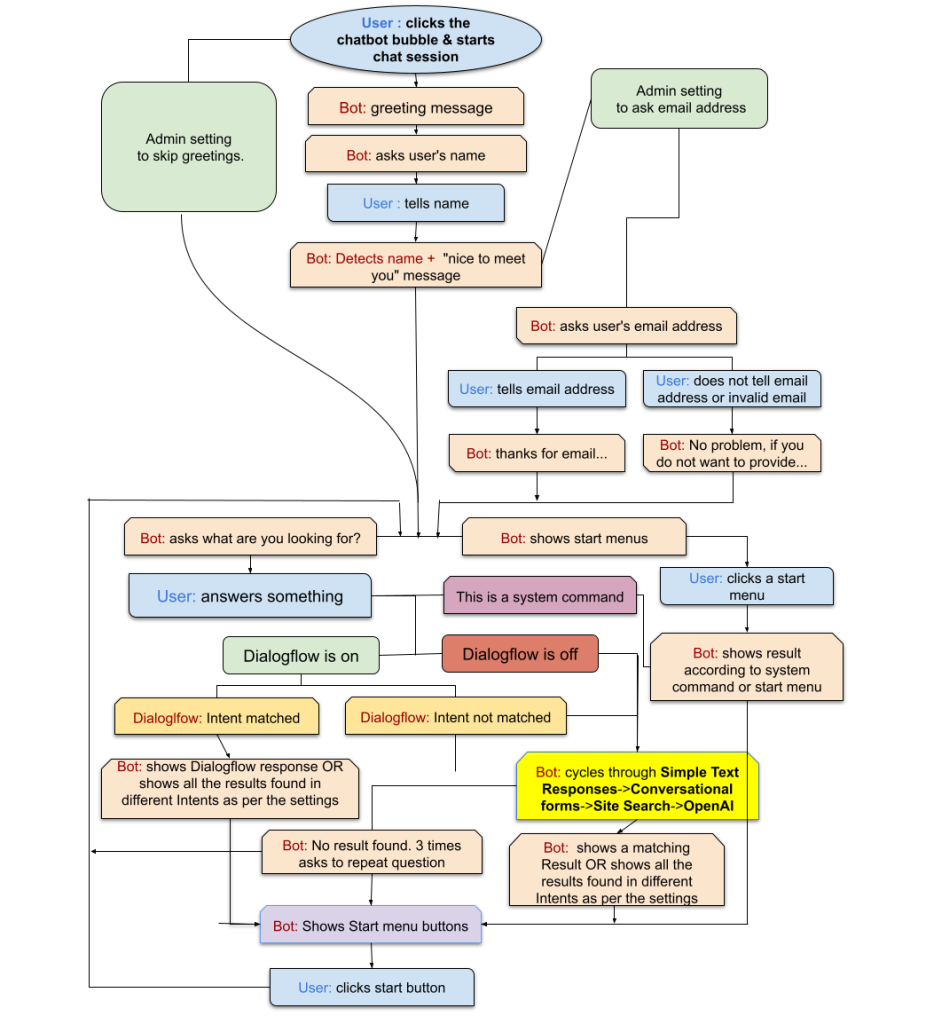
WoowBot follows a streamlined algorithm and workflow to fulfill a user request. See the diagram below to understand how the ChatBot works.

Save Time. License Better. Deploy
Faster. Reinvent WordPress.

X
Let's chat if you need any help finding the right product or need support.
FAQEmail SubscriptionProduct SearchCatalogOrder Status